
Suggestions
# Suggestions
——This article explains how to use Suggestions to automatically generate knowledge from historical conversations and expand your knowledge base.
Entry: Resource › Knowledge › Suggestions.
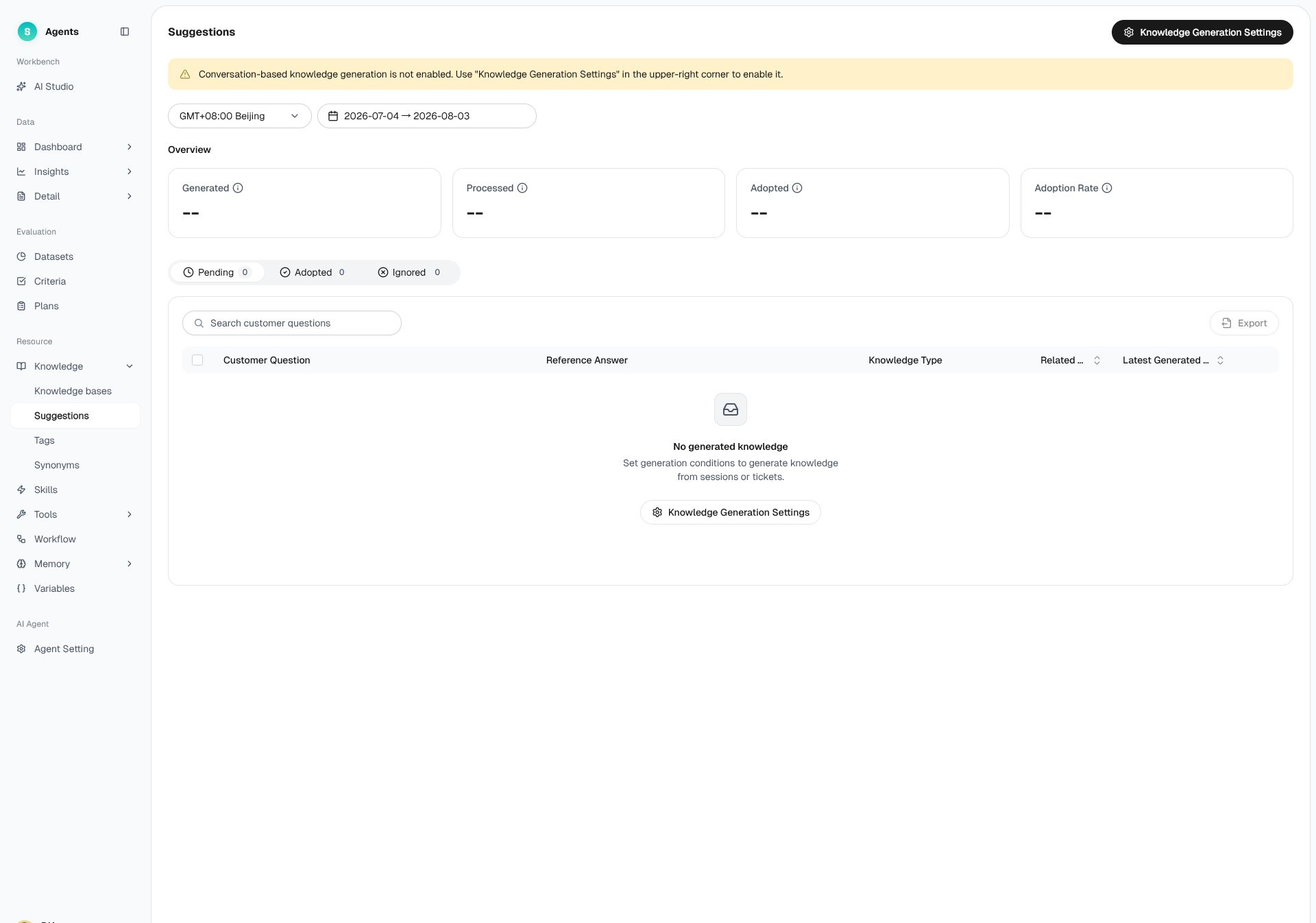
Figure 1: Suggestions list and data overview
# Suggestions Overview
Before using Suggestions, familiarize yourself with its use cases and key benefits:
- Use cases:Cold-start stage: Learn from historical conversations handled by human agents to quickly build initial knowledge coverage.Ongoing operations: Learn from human-agent conversations that occur after bot transfers to improve the bot's independent handling rate.
- Key benefits:Generate knowledge rapidly from historical conversations so that bots can use it within minutes.Continuously identify missing knowledge from recent conversations while automatically filtering highly similar duplicates.Define custom conditions to control which conversations are used to generate knowledge.
# How to Use Suggestions
# • Configuring the conversation scope
On the "Suggestions" page, click "Knowledge Generation Settings" and configure by sections such as trigger settings and output settings:
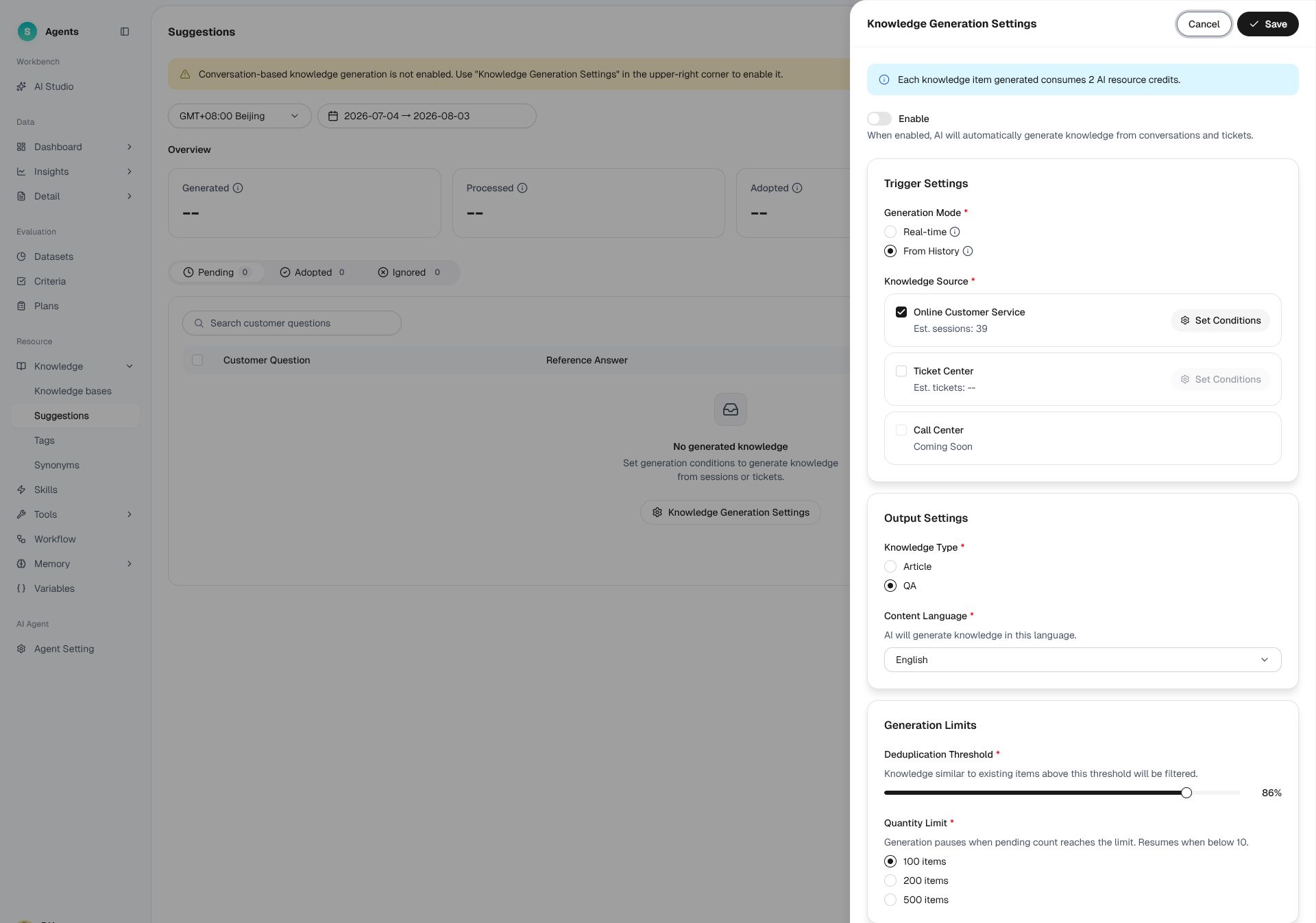
Figure 2: Knowledge Generation Settings — trigger settings and output settings
- Filter conversation scope: set the Online Service conversation scope; it is recommended to choose content that is a valid conversation for both the bot and the human agent.
- Generation mode: choose to generate in real time after a conversation ends, or generate from historical conversations within a specific time range (up to 180 days).
- Knowledge type and language: specify generation as an article or a question, and configure multiple languages.
- Dedup threshold: set a similarity threshold to filter out duplicate knowledge.
- Quantity limit: set an upper limit on unprocessed knowledge; generation pauses when it is reached.
# • Viewing and handling generated knowledge
Generated knowledge falls into three categories: pending, adopted, and ignored. Key metrics include generated count, processed count, adopted count, and adoption rate.
- Conversation detail: View the conversation this knowledge corresponds to.
- Adopt: Choose a knowledge base and category, then publish after entering the edit page.
- Ignore: Ignore the generated question and answer.
# • Recommend Existing Generated Knowledge
The system recommends similar knowledge for unprocessed clustered questions in "Customer Questions", so during bot Q&A tuning you can quickly adopt the recommended knowledge to optimize the knowledge base.
# Special Handling When Generating Knowledge
# • Conversations that are filtered out automatically
Conversations that require human intervention or offline operations, involve personal privacy, are vaguely phrased and lack key information, are short-lived, contain no useful information, or have too few or too many turns are filtered out.
# • Knowledge deduplication and merging
- Based on the configured dedup threshold, filter out knowledge that highly overlaps with existing knowledge in the knowledge base.
- Merge similar knowledge that has already been generated, and count the number of associated conversations.
# Billing
In the China environment, each generated knowledge item consumes two units from the AI resource package. In the Singapore and North America environments, each item consumes five units. A content-rich conversation may generate multiple knowledge items.