
Workflow
# Workflow
——This article helps you understand what Workflow do, and how to create a Flow and associate it with a bot.
Entry: Resource › Workflow.
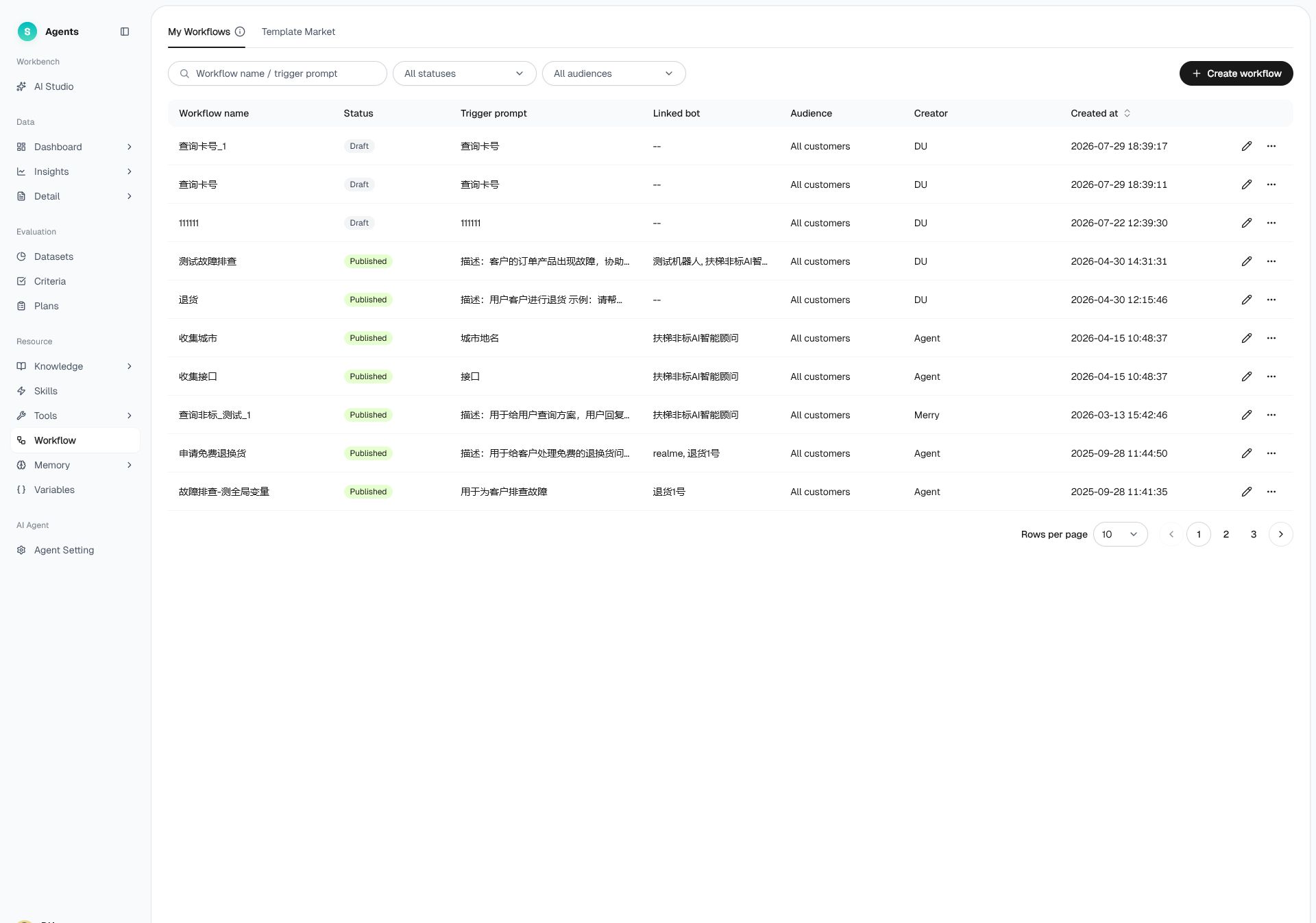
Figure 1: Workflow
# Workflow Overview
- Use case: A business process has fixed steps in a defined order, such as activating a card or dispatching a repair request, and the bot must follow those steps.
- Purpose: Arrange a fixed sequence of steps as a reusable capability. When the relevant scenario is triggered, the bot follows the Flow to ensure consistent execution.
# How to Use Workflow
# • Page Structure
- My Workflow: the list of Workflow you have created.
- Template Marketplace: Flow templates you can reference or reuse.
List columns include: flow name, status, flow trigger prompt, associated bot, applicable customer group, creator, creation time, and operations.
# • Create a Flow
- Click "Create" and fill in the flow name.
- Set the flow trigger prompt—describe the conditions under which this Flow is triggered.
- Orchestrate the flow steps, and optionally set the applicable customer group.
- Save as a draft, then publish once confirmed.
# • Association with the Bot
A Flow can be associated with specific bots and customer groups. When the bot meets the trigger condition, it enters the Flow and handles it step by step.
Last Updated: 8/7/2026, 5:00:36 PM