
Appearance
Product Updates: April 23, 2026
Overview
This upgrade focuses on the product philosophy of "smarter, more efficient, and more flexible," focusing on enhancing AI Agent, Live Chat, and Voice capabilities. Through intelligent configuration, refined operations, and optimized international experience, it comprehensively improves enterprise service capabilities and operational efficiency, helping to build a more stable, efficient, and scalable customer service system.
Intelligent Bot Configuration Reduces the Usage Threshold
Template Market Launch: Provide industry best practice templates. Enterprises can create complete bots with one click, significantly reducing construction costs.
Enhanced Debugging Capabilities: Added debugging details to the task workflow, optimized the display of algorithm information, and helped quickly locate and solve problems.
Voice Message Support: The SDK and H5 bot phases support voice message recognition and replies, enriching customer interaction methods and improving the consultation experience.
Refined Customer Service Operations, Data-Driven Decision Making
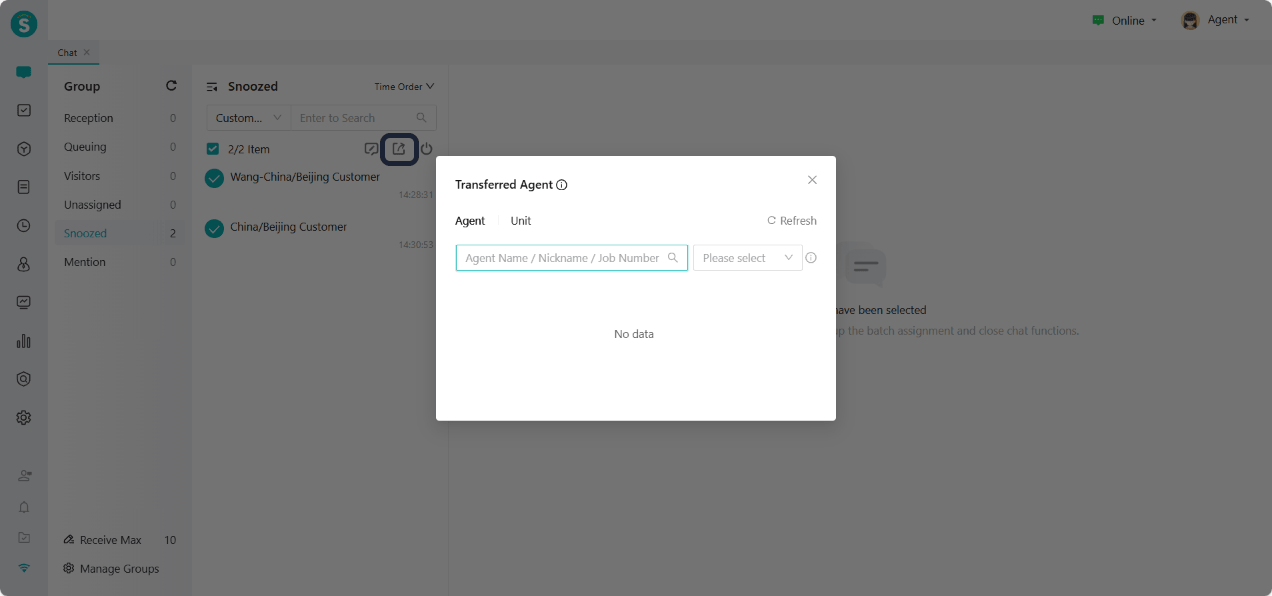
Enhanced Session Management: Support for bulk transfer of snoozed sessions, significantly improving service continuity and cross-team collaboration efficiency.
Service Time Metrics System: The voice adds relevant metrics for service time, supporting the formulation of differentiated operation strategies.
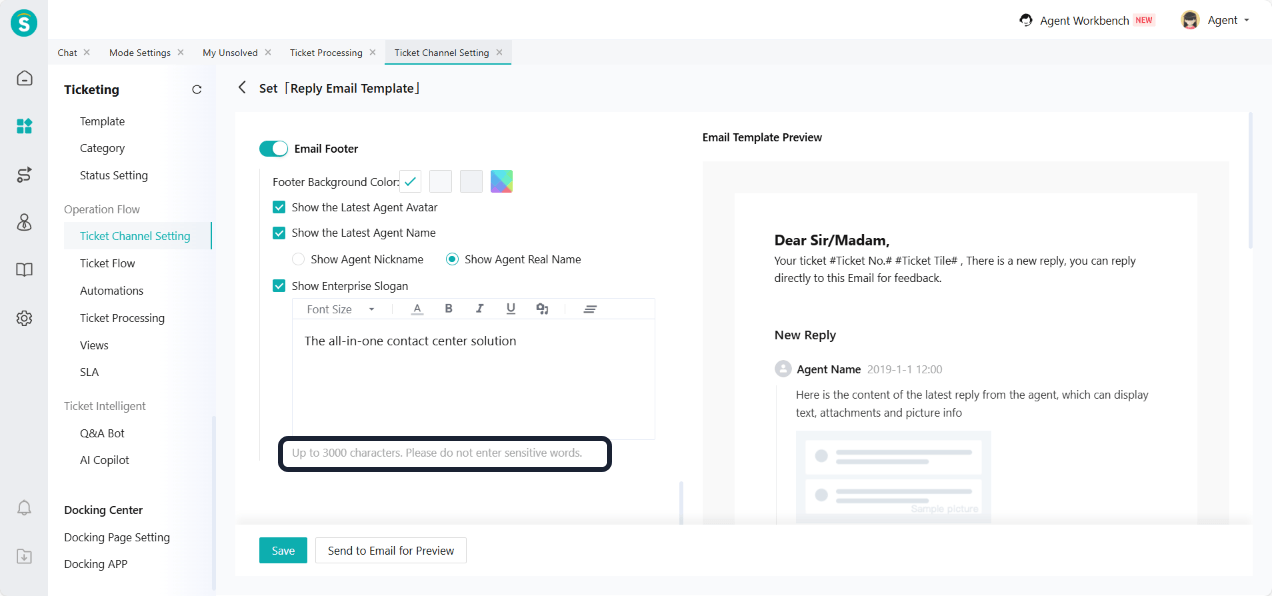
Email Feature Improvement: Email replies support emojis, email template signature character length extension, improving communication experience.
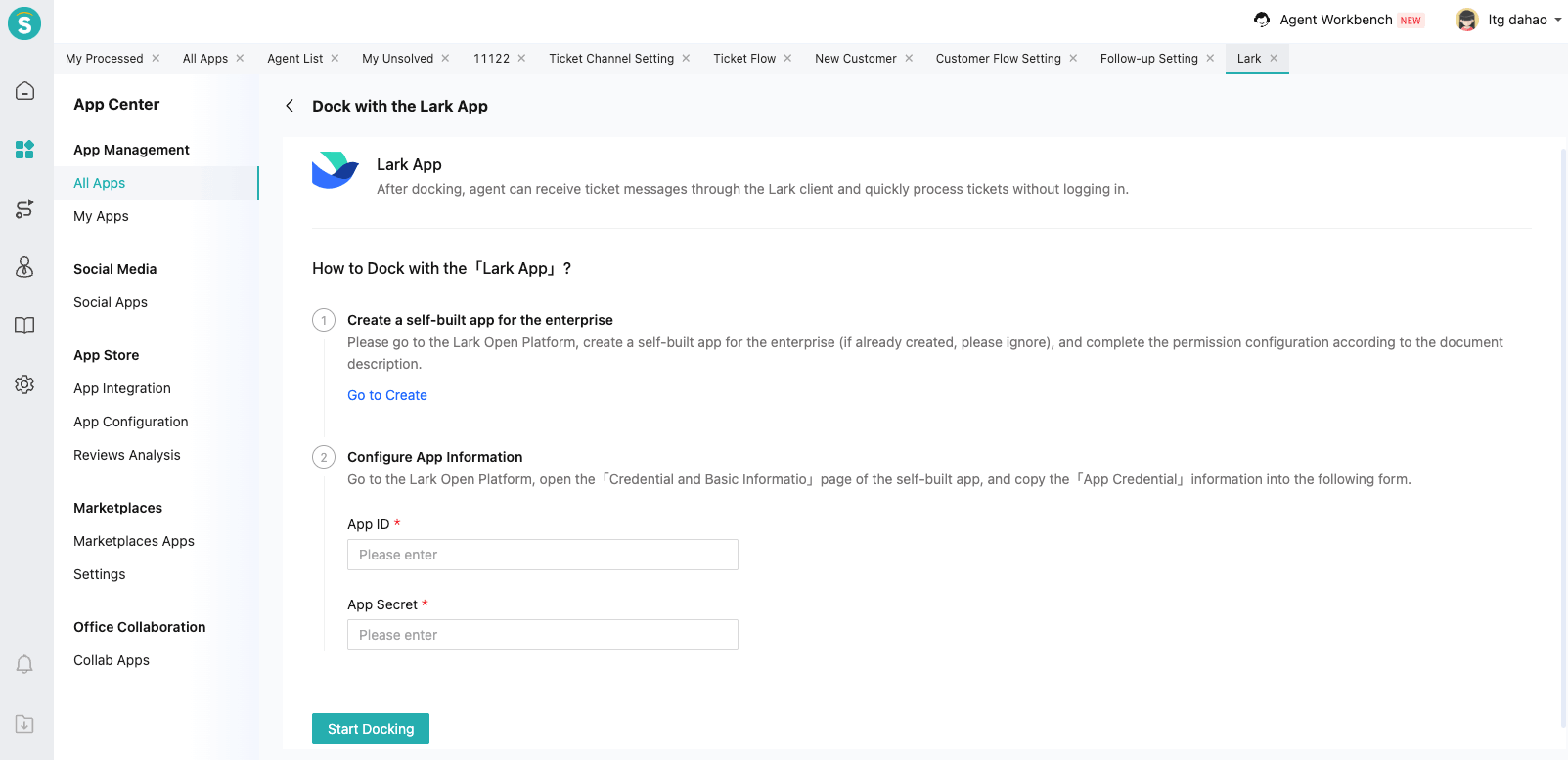
Lark Integration Support: Added the function to view and process tickets within Lark, enriching the ways for customer service access.
System Security Capabilities Enhanced, Unified Authentication Management
Dynamic Token Support: API Management adds dynamic Token authentication method, improving the security of system-to-system calls.
Interface Node Security Integration: Interface nodes in IVR and voicebots support association with dynamic tokens, enabling secure and efficient external interface calls.
Sobot is committed to empowering global enterprises with intelligent products, activating new service efficiency, and leading the new future of customer interaction.
Note: =Additions
 =Optimization
=Additions =OptimizationAI Agent
Bot Setting: Autonomous Decision-Making Bot Adds Knowledge Base Binding
Function Background
In the current autonomous decision-making mode, the module for binding Q&A knowledge has been removed. The bot completely relies on knowledge base references in the work logic to generate responses. When enterprises need to query multiple knowledge bases in a specific scenario, they have to manually click and reference each knowledge base one by one in the workflow. This process is tedious and inefficient.
Function Description
- Work Logic Description: Work Logic Description - Knowledge Base Added "All knowledge bases bound" option.
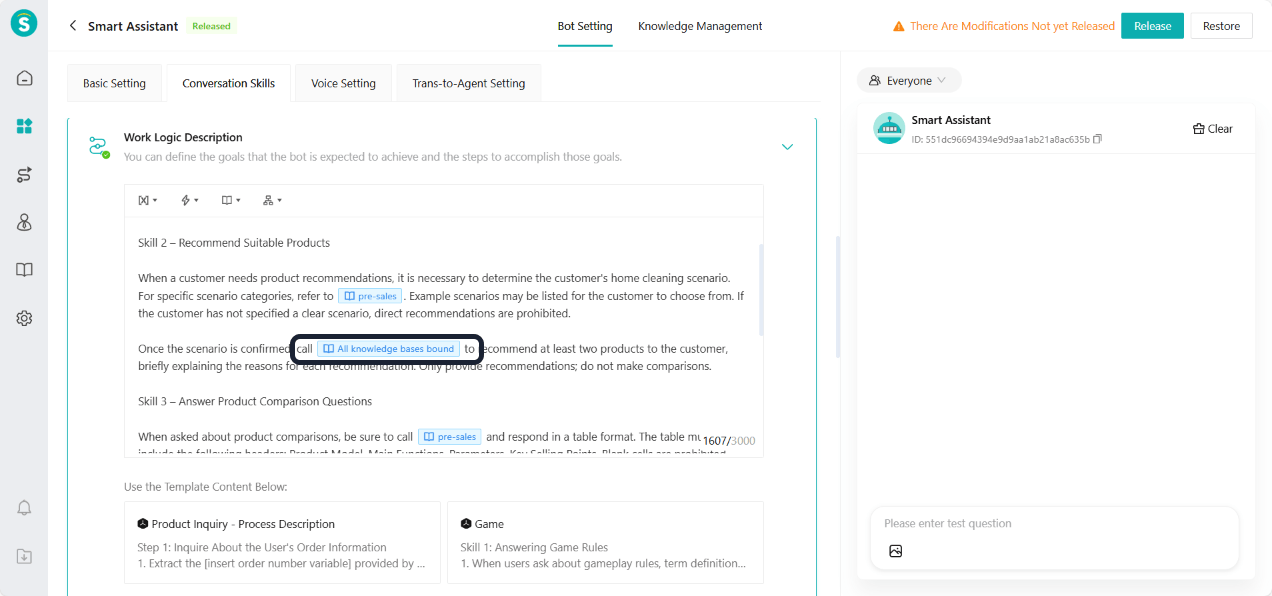
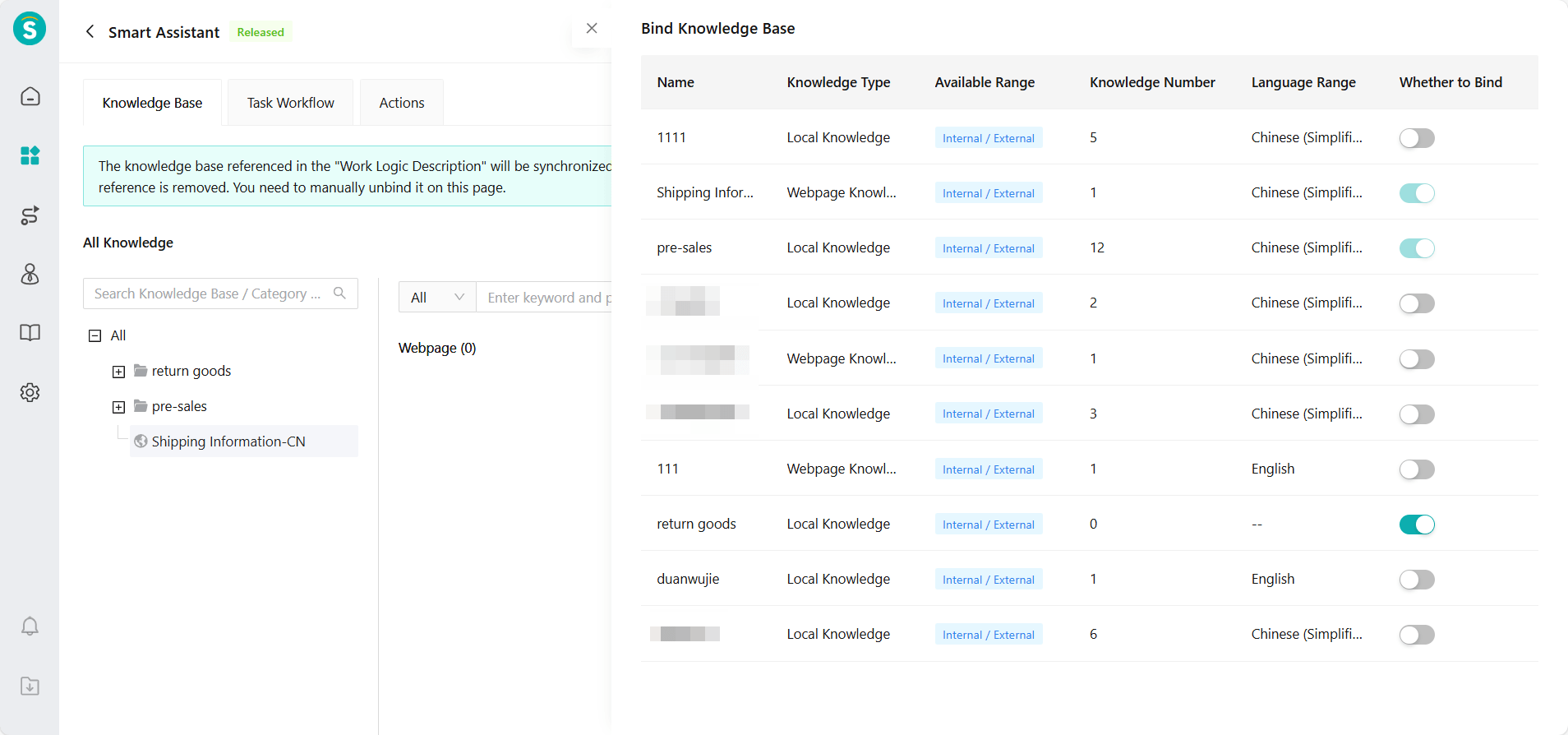
- Knowledge Management: In Knowledge Management - Knowledge Base, the autonomous decision-making bot adds a "Bind Knowledge Base" operation. When the work logic description has already configured the Q&A scenario to query "All knowledge bases bound", the bot will query all bound knowledge bases to generate answers.
Bot Setting: Template Market
Function Background
The current bot configuration has high complexity. Enterprises need to configure multiple modules such as bots, task workflows, actions, and variables. Additionally, industry best practices cannot be directly reused. This update introduces a template market, which supports one-click downloading of industry templates to quickly complete bot setup and reduce configuration costs.
Function Description
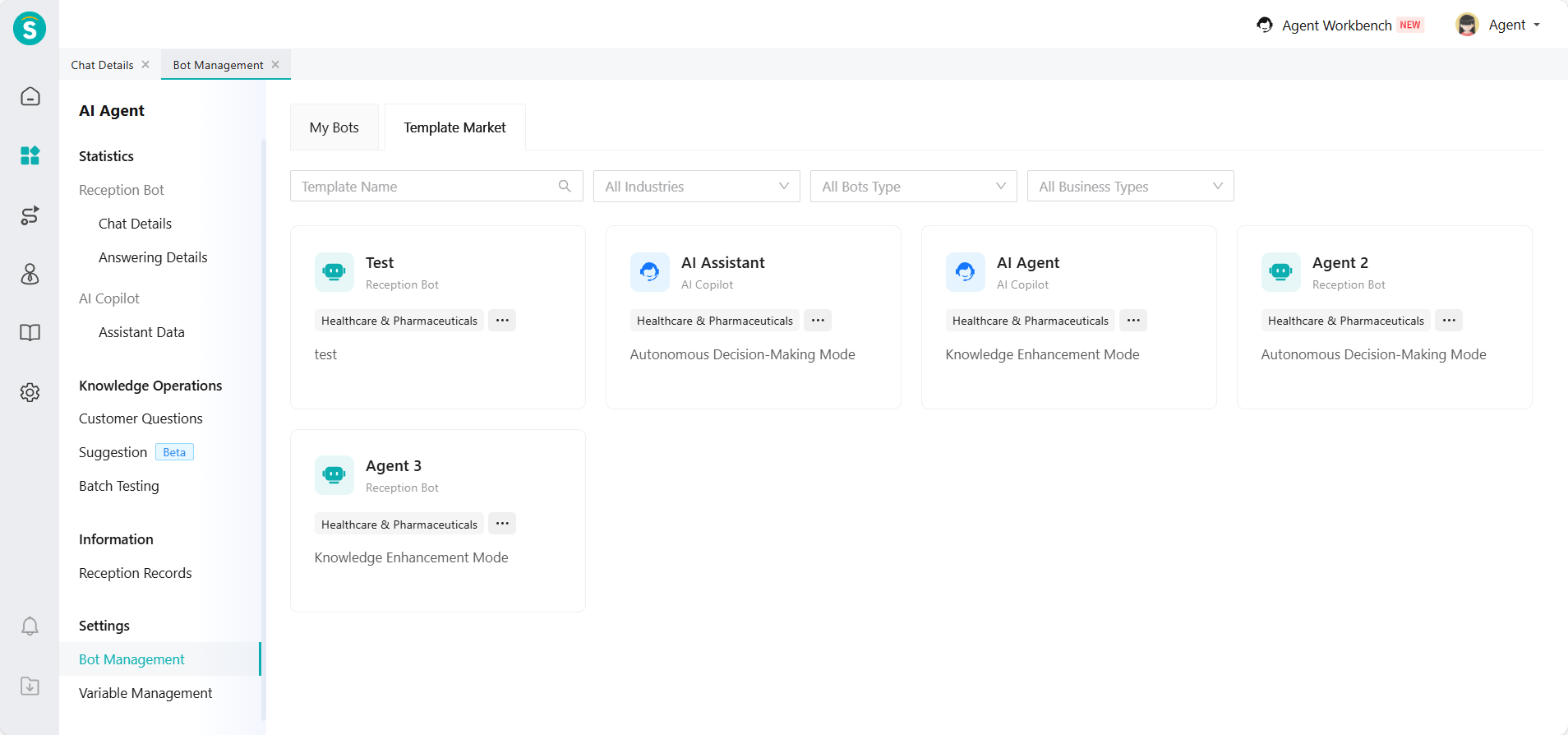
Entrance: AI Agent - Bot Management - Template Market, Knowledge Center - Workflow Management - Template Market.
Template Type:
a. Bot Template: Includes bot + task workflow + action + variable, suitable for new users to create with one click.
b. Task Workflow Template: Suitable for adding specific business scenarios to existing bots.
Note: All nodes related to interfaces in the template have been cleared. Enterprises can fill in the actual interfaces as needed after downloading the template.
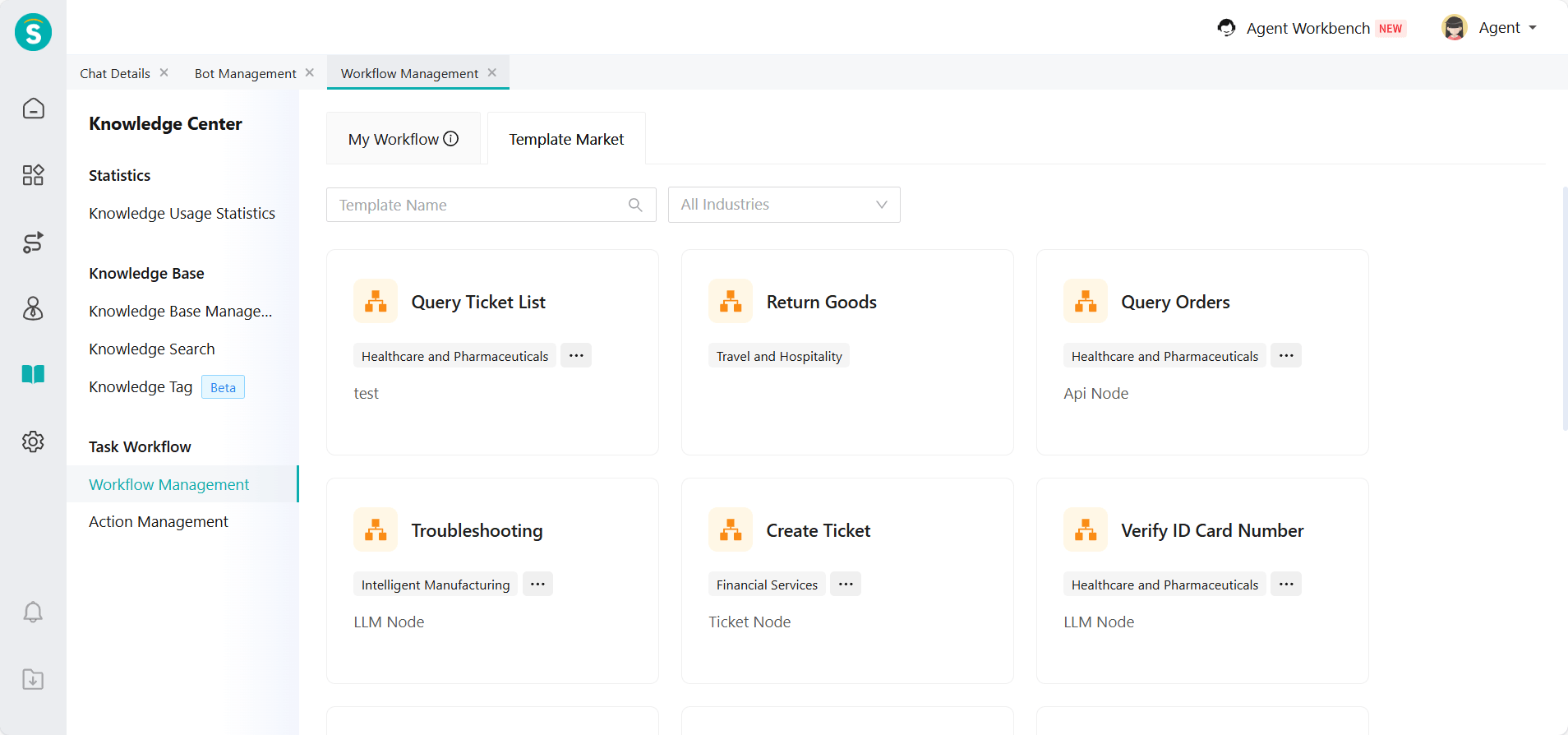
The template market is continuously updated and will provide more industry scenario templates.
Bot Setting: Logic of Trans-to-Agent by Keywords
Function Background
The current system supports configuring trans-to-agent by keywords in "Bot Settings - Trans-to-Agent Setting". When a customer's conversation matches the keywords, it will trigger a transfer to an agent.
In some customer scenarios, the same meaning often has multiple variations in capitalization. The current keyword matching uses a strict case-sensitive mode, which requires enterprises to configure multiple keywords with different capitalizations for the same meaning. This repetitive configuration not only increases management costs but also makes it easy to miss certain variations, leading to a low actual hit rate for transferring to agents, and affecting the customer service experience.
Function Description
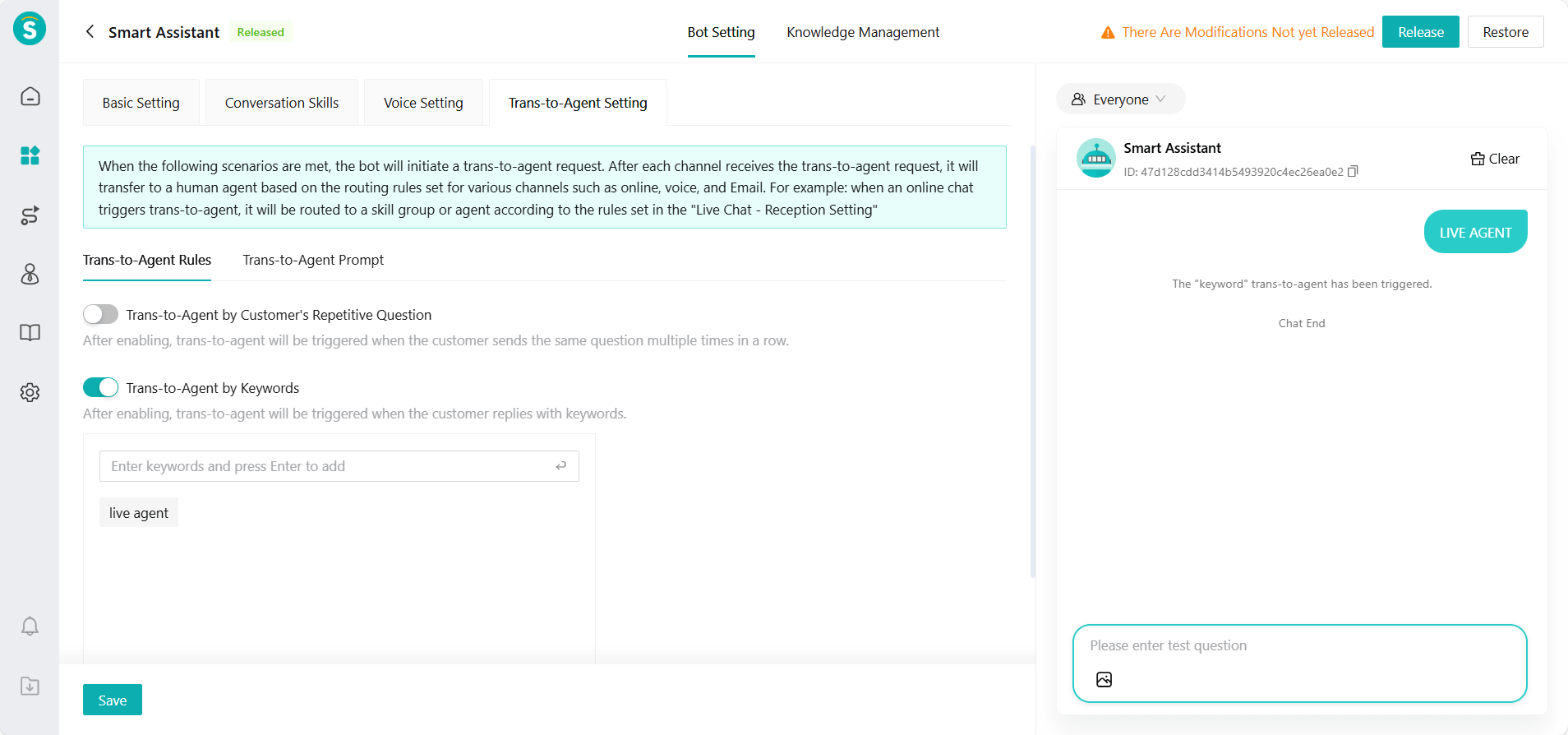
When AI Agents answer questions, the verification rules for optimizing the trans-to-agent keywords are improved. The system no longer distinguishes between uppercase and lowercase letters. Different cases of the same keyword will be regarded as the same keyword.
Example:
Trans-to-agent configuration keyword: live agent
The following customer inputs can trigger a transfer to an agent:
Live agent
LIVE AGENT
Live Agent
Bot Setting: Bot Copy Function
Function Background
Some enterprises create multiple bots for different countries or regions. These bots have basically the same basic configuration and scenarios. The main differences lie in the content of the knowledge base (such as policies, languages, and product information in different countries or regions). Therefore, it is necessary to support the quick replication of already created bots, so that fine-tuning can be done based on existing configurations.
Function Description
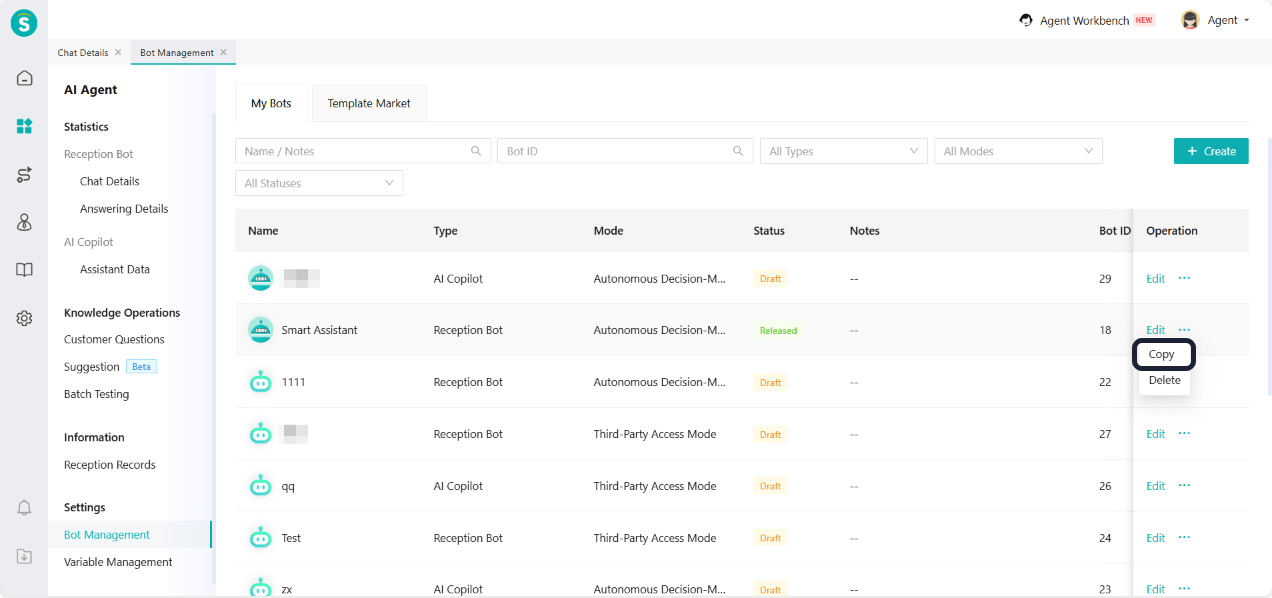
Bot Management - My Bots added copy function. After clicking copy, the system will copy all content (including bot mode, knowledge base, task workflow, etc.) based on the draft version configuration of the current bot to generate a duplicate bot. The duplicate will be automatically named as "Bot Name_Number", and the created duplicate will default to the draft version.
Bot Setting: Third-Party Bot Language Setting
Function Background
Some enterprises' self-owned Agent platforms have question-answering capabilities. Sobot already supports the third-party access mode, which can forward customer messages to a third party and reply based on their results. However, in voice scenarios, a single bot only supports one ASR model, and the language attribute of the ASR model needs to be consistent with the default language of the bot. Currently, third-party bots lack the ability to set languages.
Function Description
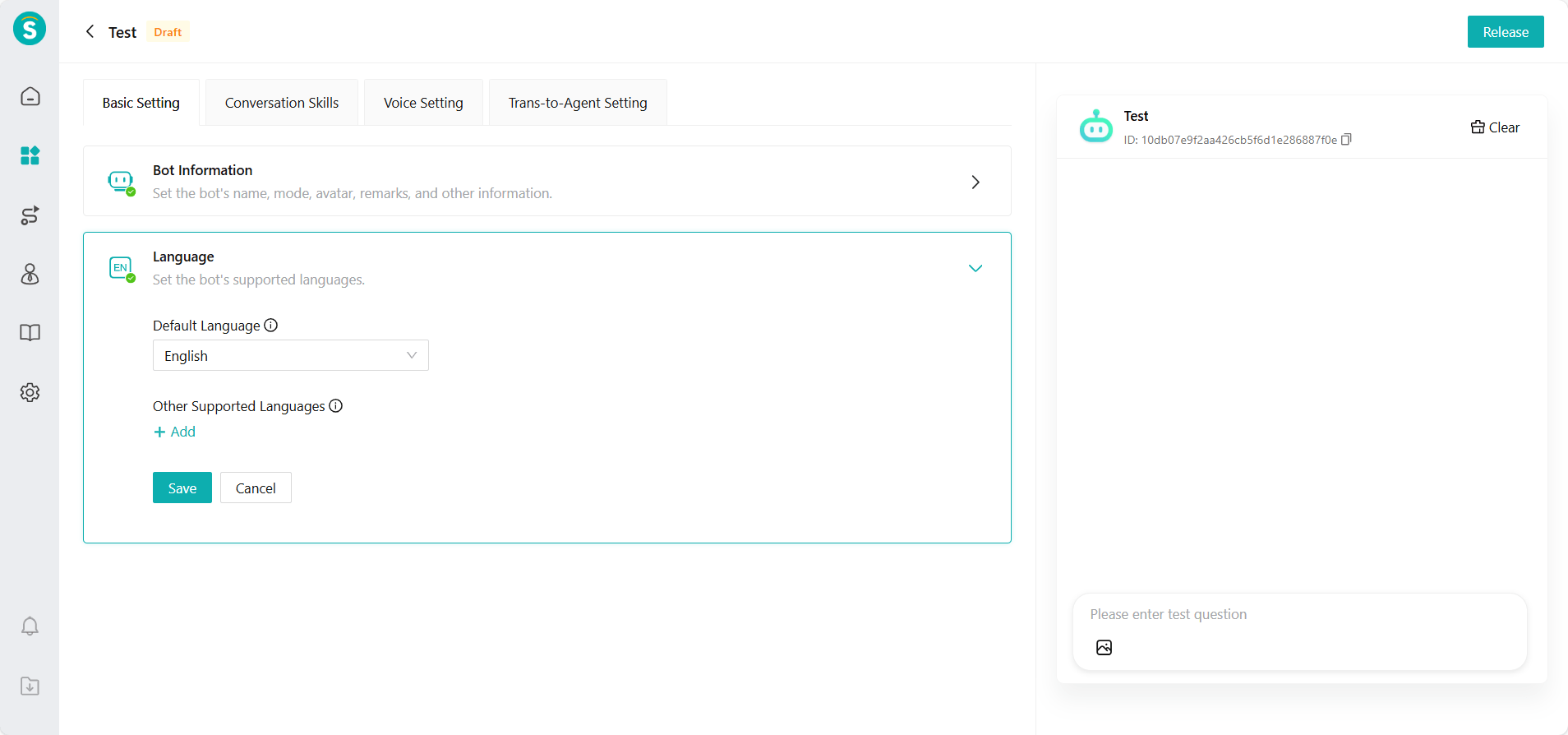
Third-party bots now support language settings and can answer voice questions.
Bot Debugging: Optimization of Autonomous Decision-Making Bot Algorithm Information
Function Background
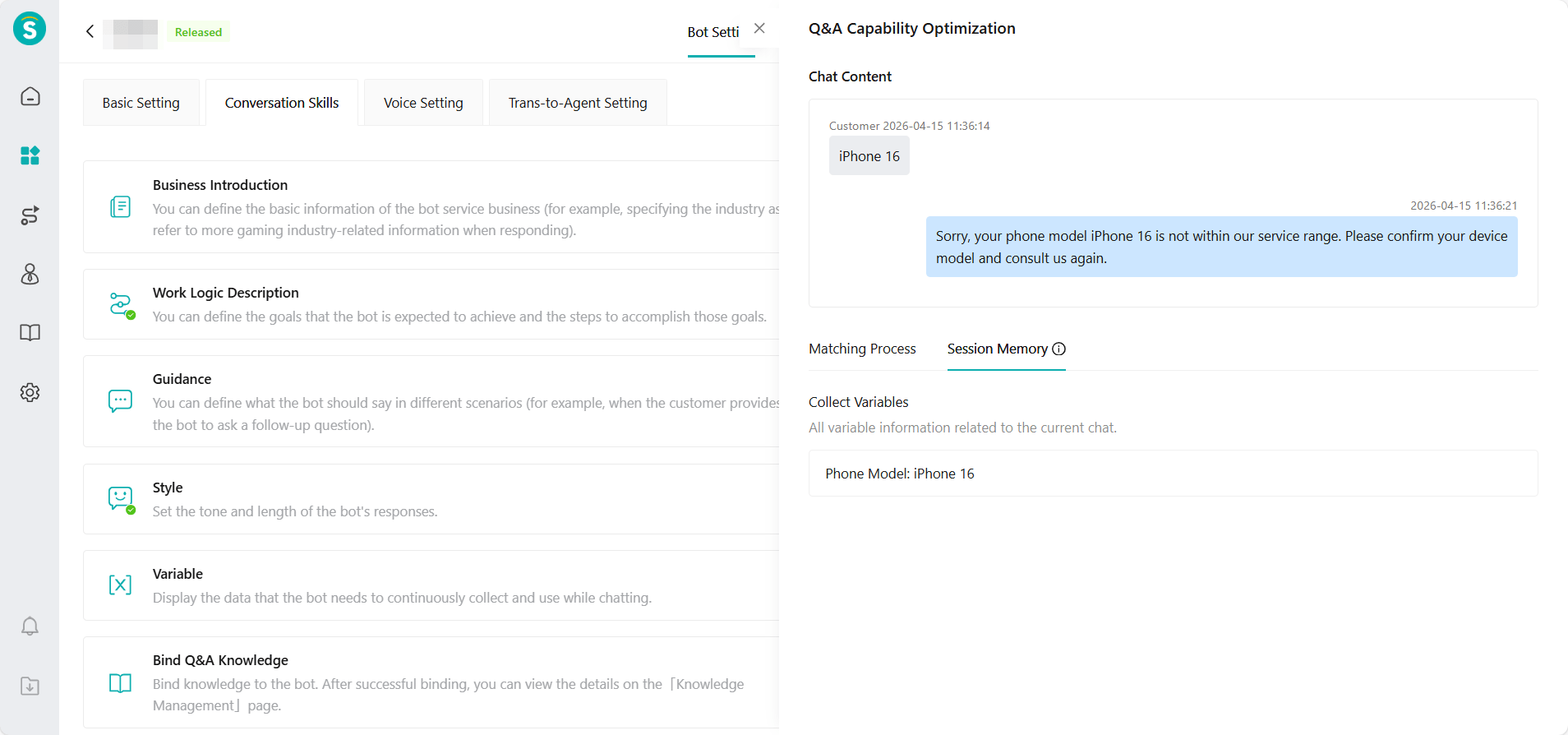
In autonomous decision-making mode, the bot independently decides what to call to generate a response. The debugging window for the original algorithm focuses on knowledge optimization and does not fully display the bot's actual invocation situation.
Function Description
The algorithm information of autonomous decision-making bots is optimized into two parts: matching process and session memory. The specific display content is as follows:
Matching Process: Show the invocation status of the bot when generating responses, and display according to the actual invocation results.
a. Search Knowledge: Display knowledge search results.
b. Collect Variables: Display the information of the collected variables.
c. Task Workflow: Show the workflow matching status and the nodes passed through.
d. Invoke Action: Display the result of the action invocation.
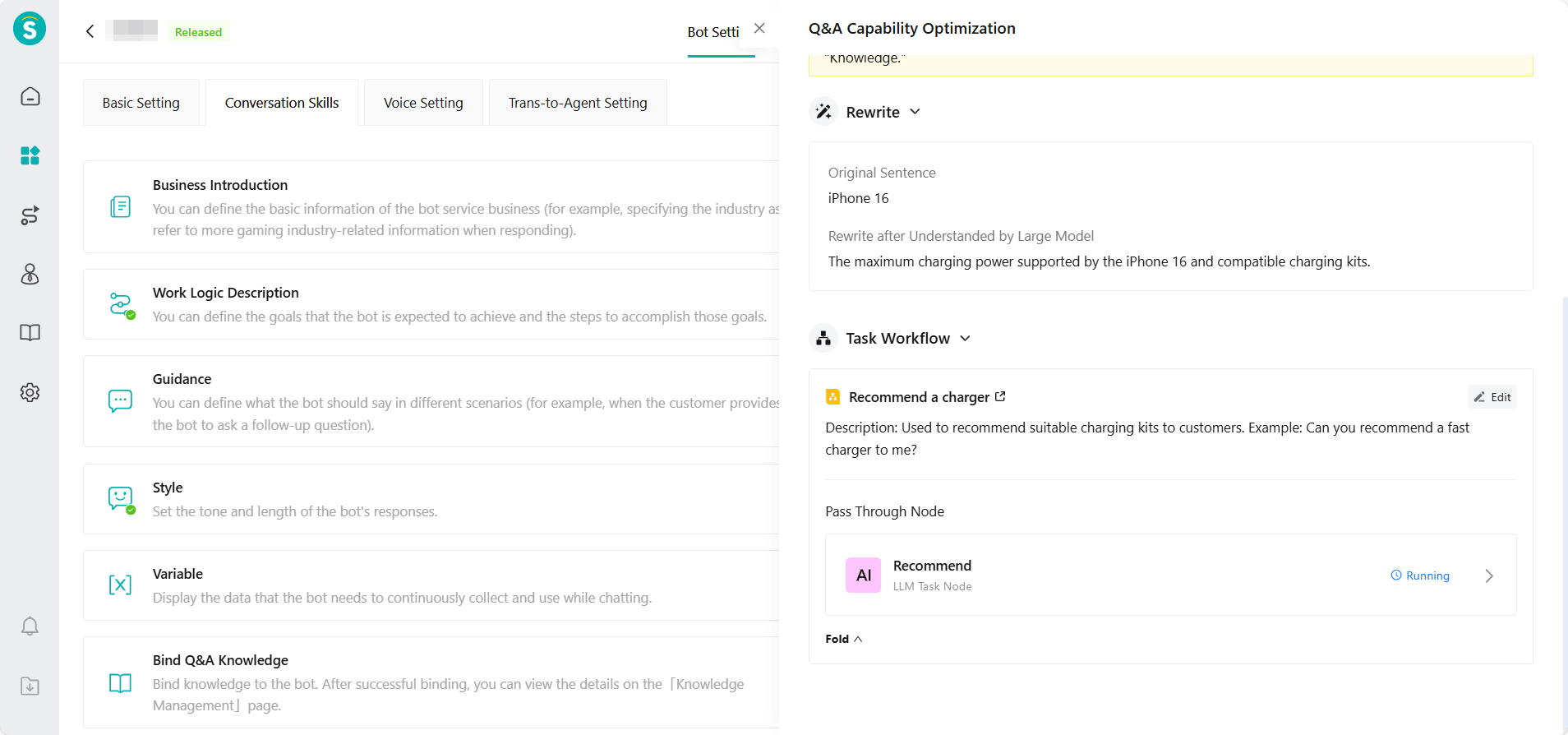
- Session Memory: Records the variable information that the bot has collected in the current session.
Bot Debugging: Task Workflow Debugging Details
Function Background
The current task workflow cannot show the real-time running status inside the flow or the specific execution details of each node while it is running. If the process encounters an issue or does not perform as expected, problem diagnosis can only rely on guesswork, making it difficult to quickly identify the problematic node.
Function Description
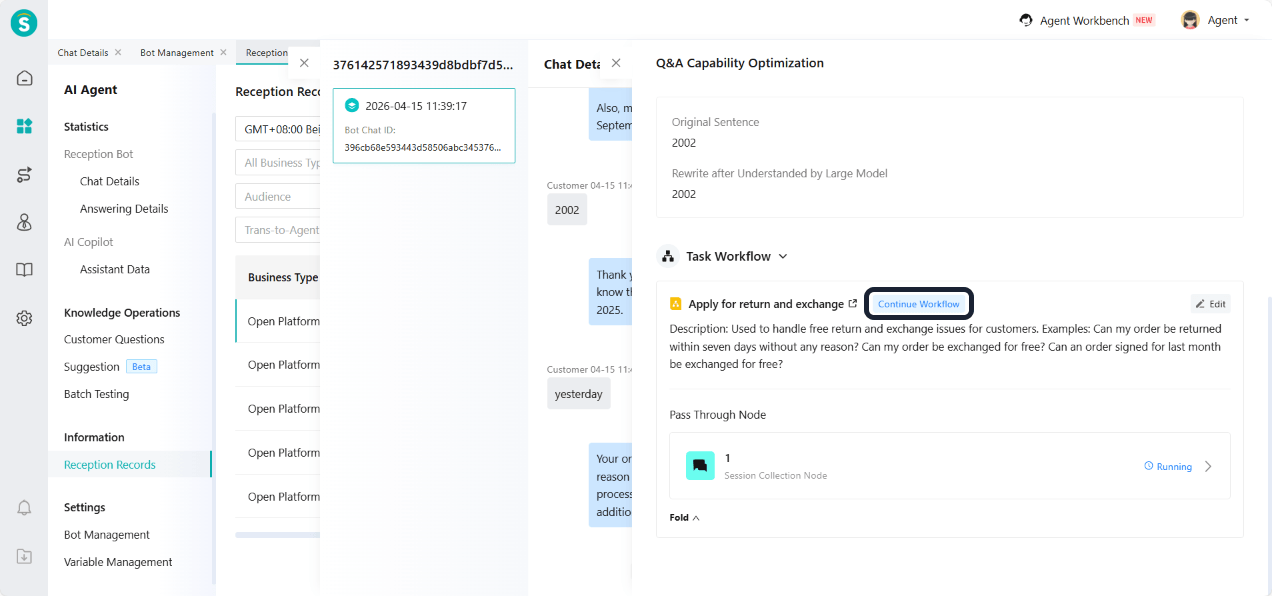
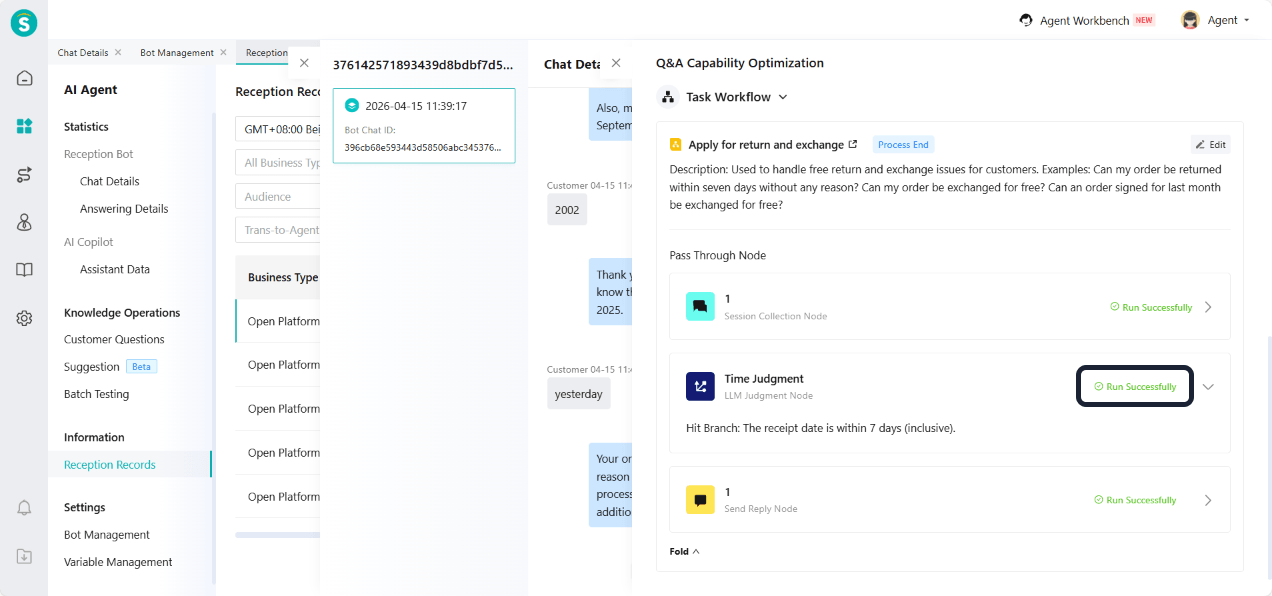
To improve the observability and debugging efficiency of task workflows, this update adds a debugging details feature for task workflows. The specific display content is as follows:
- Process Status: Real-time display of the current running status of the task process, including key statuses such as continue workflow, intent confirmation, and workflow completion, helping administrators quickly understand the execution of the process.
- Passed Nodes: Clearly display the current task workflow nodes and execution status (Running Successfully / Running) of the problem, and support expanding to view detailed node execution information.
Bot Q&A: SDK, H5 Bot Phase Supports Voice Messages
Function Background
AI Agents can serve customers through SDK and H5 pages. However, in actual use, the bot cannot recognize or understand voice messages sent by customers, which prevents it from automatically answering questions and affects the customer's consultation experience.
Function Description
Customers can use the "Press and hold to speak" function to send voice messages when consulting through the SDK or H5 page. The AI Agent supports recognizing the voice content and replying based on the questions.
Note: The enterprise needs to purchase the ASR resource package.
Bot Q&A: Secure Return of Streaming Output Links
Function Background
Currently, when the AI agent is in streaming output mode, hyperlinks in the response content will be output in real-time character by character or token by token. When the page renders these incomplete contents in real time, the following security risks may occur:
Link code snippets (such as
<a href="https://xxx?token=xxxx">) will be exposed during the generation process.Sensitive token parameters in the URL may be leaked in advance.
Customers can view the page source code to obtain the complete link concatenation rules.
These issues may lead to token leakage and external links being intercepted. This not only violates security rules but also may trigger security complaints from enterprise customers.
Function Description
When the AI agent outputs in a streaming way, once an <a> tag is detected, the system will first generate the complete link content before showing it to the customer. This effectively avoids the risk of sensitive information leaking during the generation process.
Voice
Service Time Related Inbound Call Loss Metrics for Phone Number Reports
Function Background
Some enterprises have the need to differentiate between service hours and non-service hours. They need to count incoming calls separately for service and non-service hours to create corresponding business rules and operation strategies.
Function Description
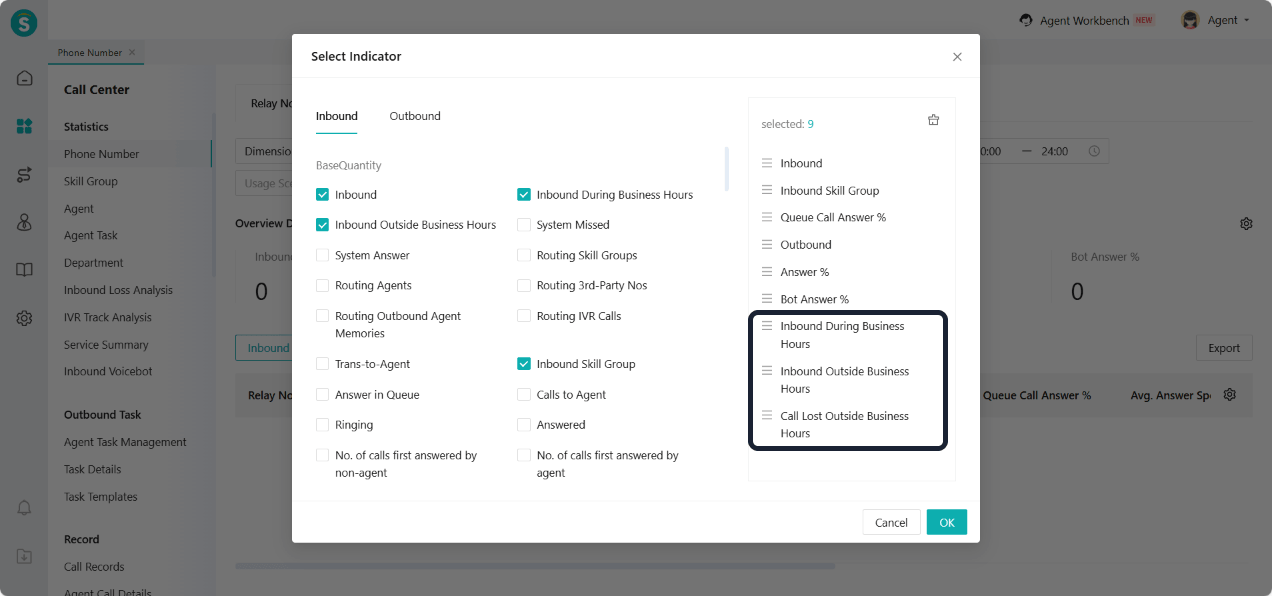
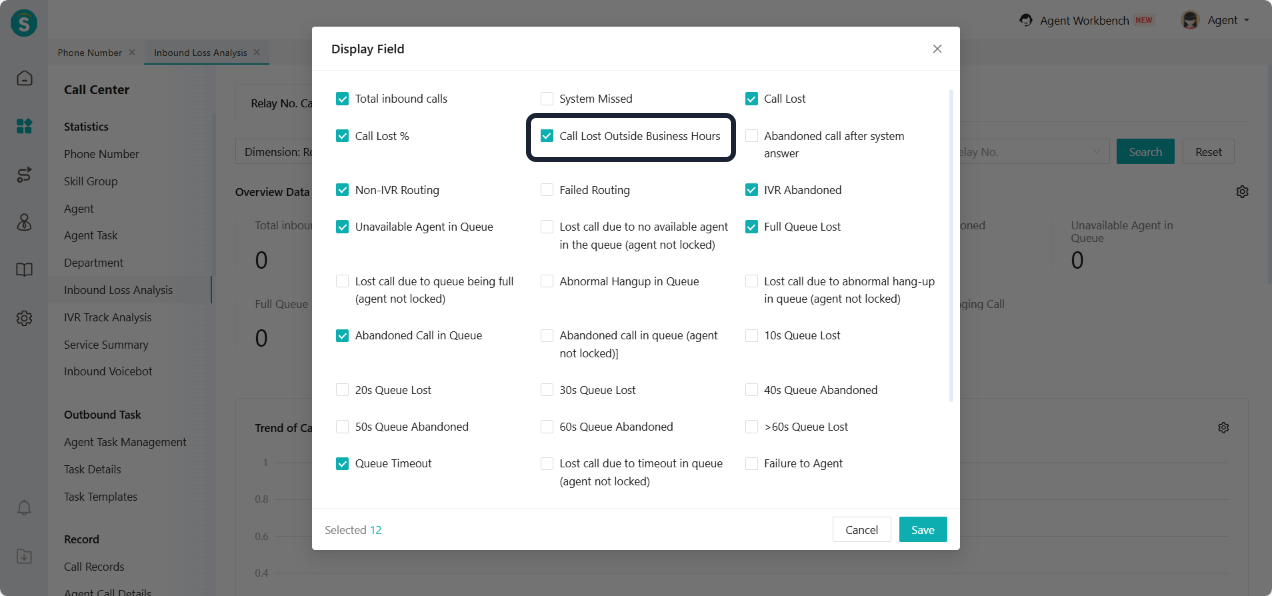
The overview data, data list, and custom kanban of the phone number report have added the indicators "Inbound During Business Hours", "Inbound Outside Business Hours", and "Call Lost Outside Business Hours". The indicator descriptions are as follows:
Inbound During Business Hours: The total number of inbound calls within "Business Hours". Note: The "Mark Calls During Business Hours" function must be enabled in "Settings - Calculation Rules" for this indicator to generate data.
Inbound Outside Business Hours: Total number of inbound calls outside of "Business Hours". Note: The "Mark Calls During Business Hours" function must be enabled in "Settings - Calculation Rules" for this indicator to generate data.
Call Lost Outside Business Hours: The total number of inbound calls that were not answered by the agent side and occurred outside of "Business Hours". Note: The "Mark Calls Within Service Time" feature must be enabled in "Settings - Calculation Rules" for this indicator to generate data.
Non-Service Time Call Loss Indicator for Inbound Loss Analysis
Function Background
Some enterprises have the need to differentiate between service hours and non-service hours. In call loss scenarios, it is necessary to count call losses during non-service hours to formulate corresponding business rules and operational strategies.
Function Description
Inbound Loss Analysis - Relay No. Call Loss: Added "Call Lost Outside Business Hours" metric to the overview data, trend of call loss, and call loss detail. The indicator description is as follows:
Call Lost Outside Business Hours: The total number of inbound calls that were not answered by the agent side and occurred outside of "Business Hours". Note: The "Mark Calls Within Service Time" feature must be enabled in "Settings - Calculation Rules" for this indicator to generate data.
Function to Mark Calls During Business Hours
Function Background
Some enterprises implement differentiated reception strategies for service hours versus non-service hours, requiring refined business rules based on this. This update supports configuring service hour markers in calculation rules to meet enterprises' refined operational needs.
Feature Description
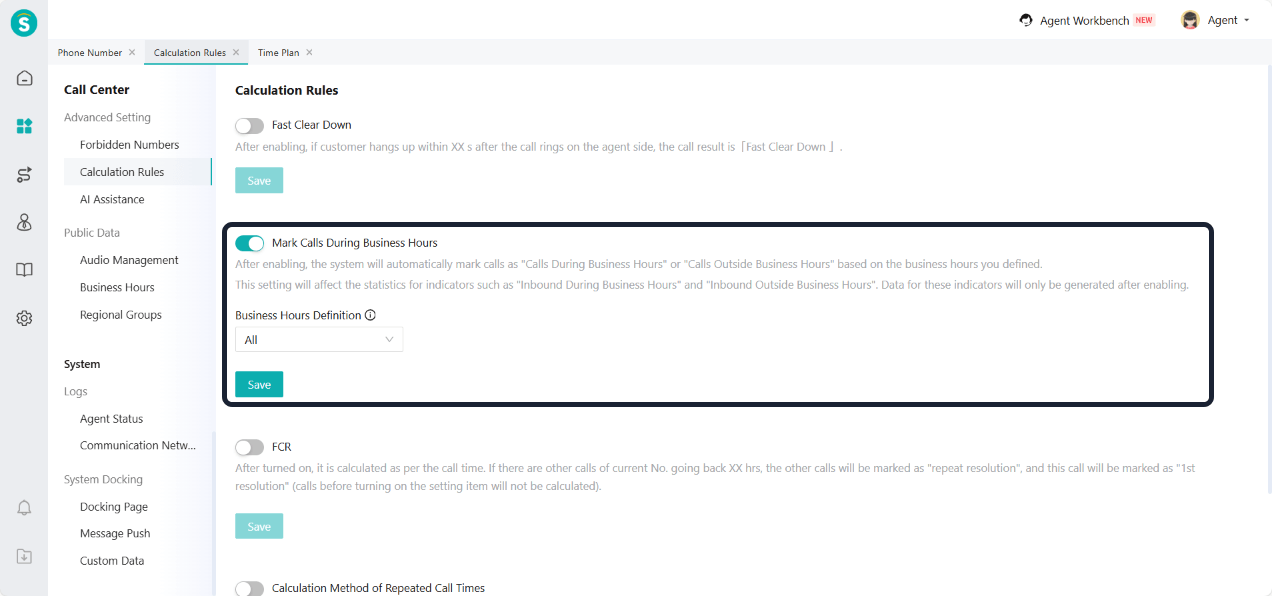
Setting - Advanced Setting - Calculation Rules add "Mark Calls During Business Hours" switch:
After enabling, the system will automatically mark calls as "Calls During Business Hours" or "Calls Outside Business Hours" based on the service hours you defined.
This setting directly affects the statistics of metrics such as "Inbound During Business Hours" and "Inbound Outside Business Hours". Data for these indicators will only be generated after enabling.
Business Hours Definition:
a.The business hours range is the collection of selected "Time Plan". A maximum of 10 can be selected.
b. Enterprise can create time schemes at Settings - Public Data - Time Plan.
Inbound Bot API Call Node Supports Associating Token in API Management
Function Background
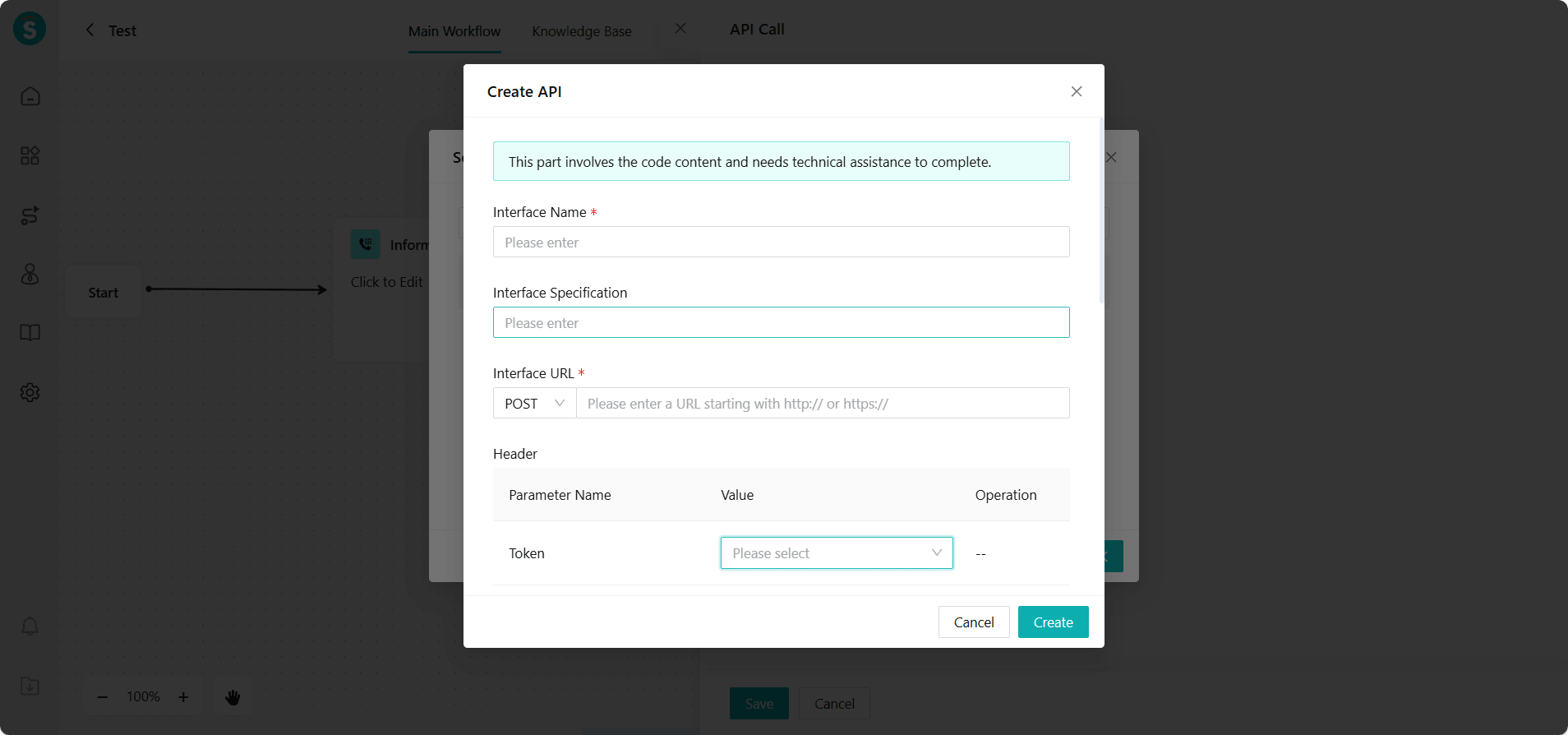
In the canvas flow of inbound bots, API call nodes often need to call external interfaces to obtain or submit data. If the external interface requires Token authentication, enterprises need to manually configure authentication parameters within the node. This process is tedious and not easy to reuse. When the API or Token changes, each node needs to be modified individually, resulting in high maintenance costs.
Function Description
Optimize the authentication configuration method for the inbound bot - API call node, and support direct association with the Token capability configured in the Admin Center - Business and Rule - API Management module.
Enterprises can quickly select existing Token configurations in the node without repeatedly filling in authentication parameters. After association, the system automatically completes the acquisition and inclusion of the Token when calling the interface. When the Token information is updated in interface management, all associated nodes take effect automatically, improving configuration efficiency and maintainability.
IVR Data Request Node Supports Associating Token in API Management
Function Background
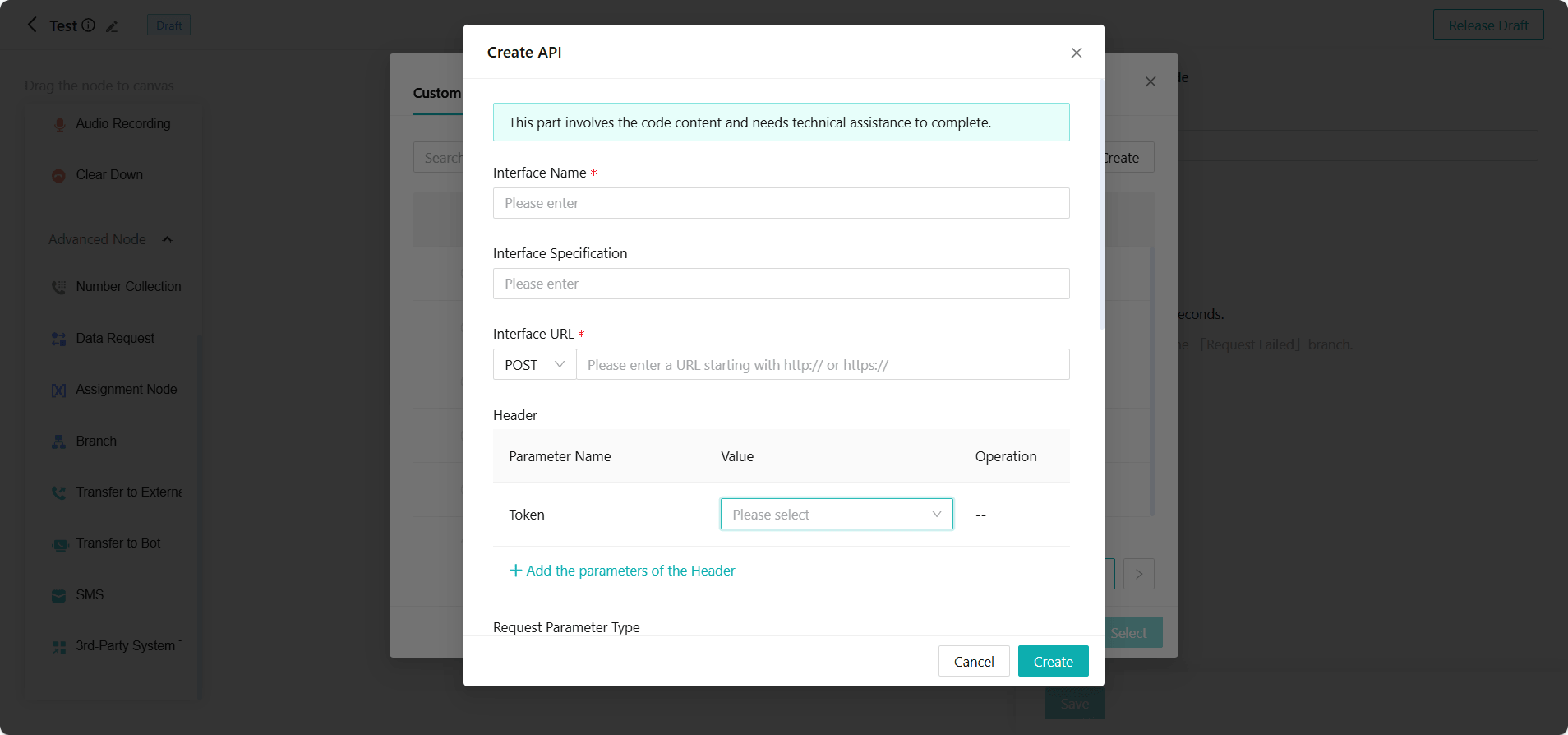
In the IVR Flow, data request nodes often need to call external interfaces to obtain or submit data. If the external interface requires Token authentication, enterprises need to manually configure authentication parameters within the node. This configuration is complicated and not easy to reuse. When the interface or Token changes, each node needs to be modified individually, resulting in high maintenance costs.
Function Description
Optimize the authentication configuration method for the IVR Flow - Data Request Node, and support direct association with the Token capabilities already configured in the Admin Center - Business and Rule - API Management module.
Enterprises can quickly select existing Token configurations in the node without repeatedly filling in authentication parameters. After association, the system automatically completes the acquisition and inclusion of the Token when calling the interface. When the Token information is updated in interface management, all associated nodes take effect automatically, improving configuration efficiency and maintainability.
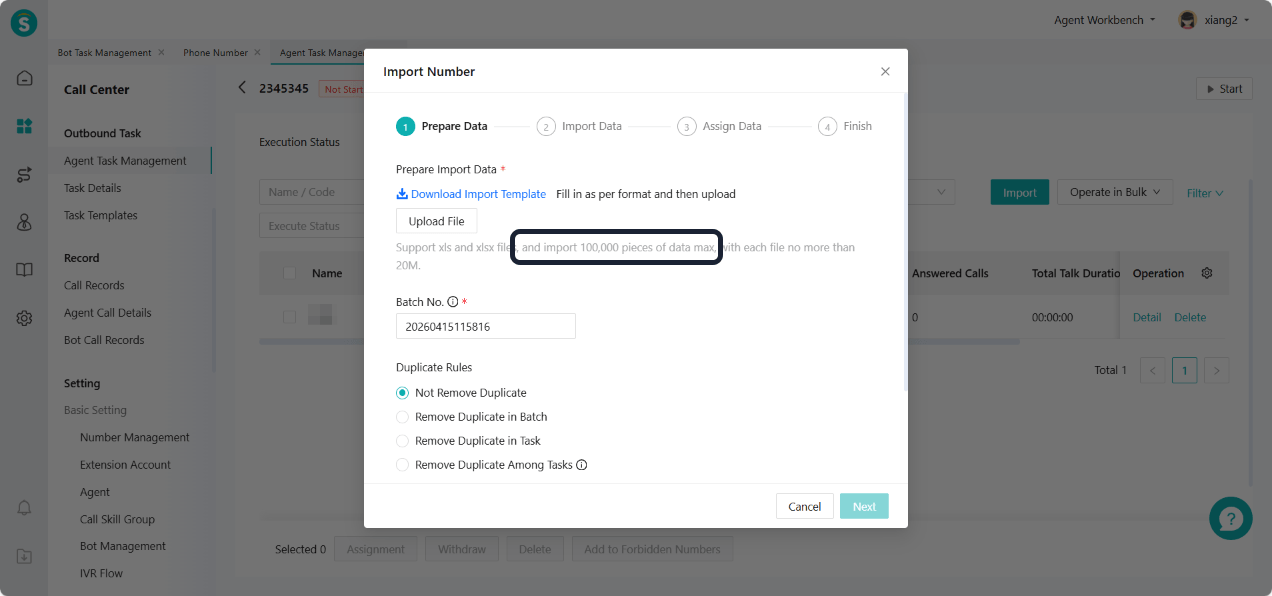
Outbound Task Single Import Supports 100,000+ Data
Function Background
In large-scale outbound call scenarios (such as marketing campaigns, customer follow-ups, and satisfaction surveys), enterprises often need to import hundreds of thousands of contact data entries at once. Previously, due to the limit on the maximum number of imports, enterprises had to import data in multiple batches, which was cumbersome and time-consuming, affecting the efficiency of task distribution.
Function Description
Optimize the data import capability for outbound call tasks. A single task supports importing up to 100,000 data entries.
The system processes imported files in batches and parses them asynchronously, avoiding page timeouts or lag caused by large amounts of data. Enterprises can complete the upload of large-scale outbound call lists and task creation in one go, significantly improving operational efficiency in batch outbound call scenarios.
IVR Transfer to External Line Node Supports Transmitting Key Presses
Function Background
After the customer call is transferred via the external line node to an external number, subsequent keypress operations cannot be transmitted to the external side. This prevents the external system from executing corresponding business logic based on the customer's keypress actions. This limitation affects external scenarios that require keypress interactions, making it impossible for enterprises to achieve a complete cross-system voice interaction process, resulting in low efficiency in service handling.
Function Description
IVR Flow - Transfer to External Line Node Supports transmitting customer keypress information to an external line number, ensuring the external system can properly receive and process customer keypress actions, achieving a complete voice interaction loop.
API Documentation Supports Querying Real-Time Transcription Records of Specified Calls
Function Background
During the call, the real-time transcription capability can quickly convert voice content into text, making it easy for enterprise business systems to monitor in real time, analyze content, or automatically fill out work orders. Previously, there was no standardized interface to obtain real-time transcription records, making it difficult for external systems to call them on demand, which limited the business application value of voice data.
Function Description
A new open API is added to support third-party business systems querying real-time transcription records of specified calls by unique call identifiers (such as Call ID, Session Number, etc.). Enterprises can flexibly call this API after the call ends based on business needs, improving the utilization efficiency of voice data.
Outbound Voicebot (General Version)
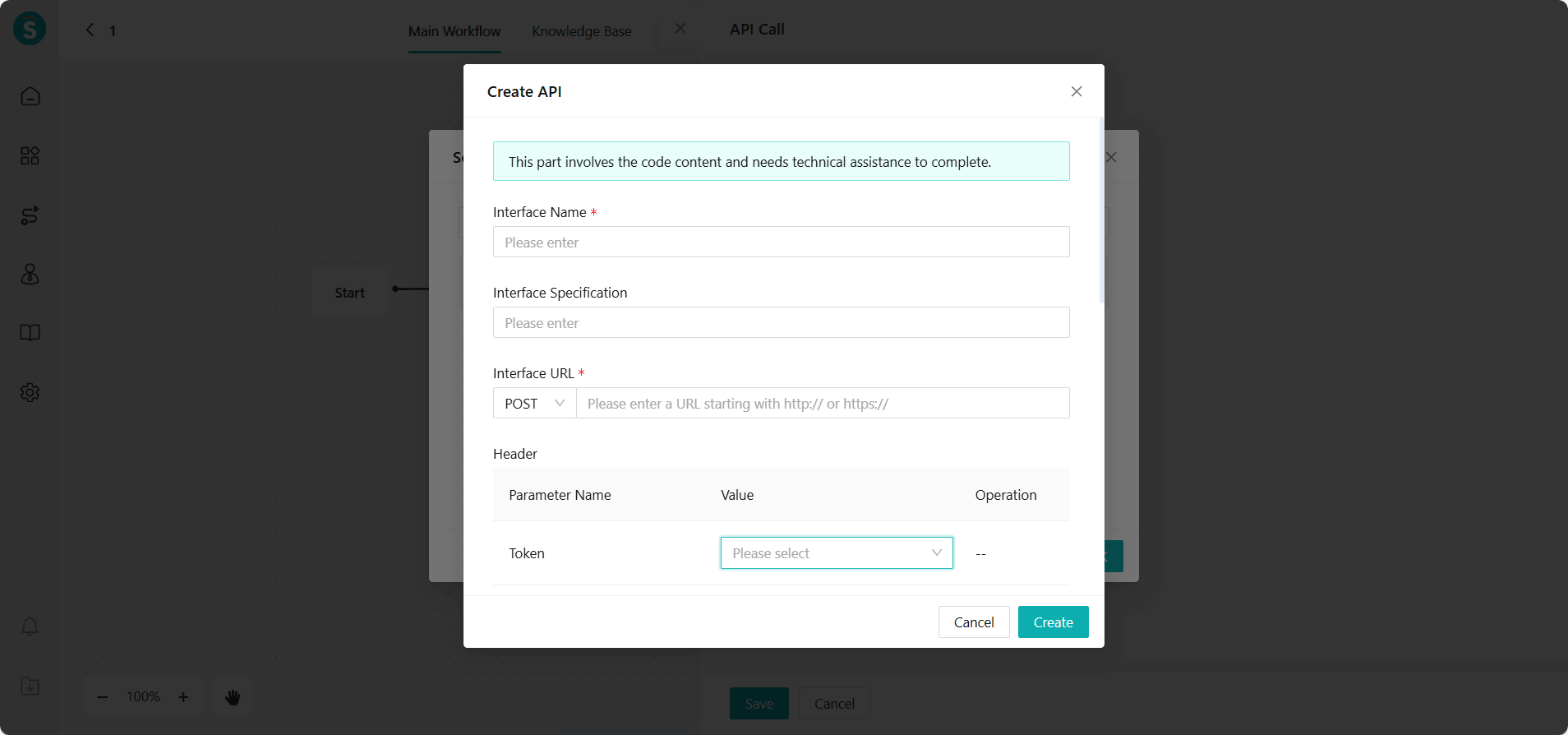
Outbound Voicebot API Call Node Supports Associating Token in API Management
Function Background
In the canvas process of outbound voicebots, API call nodes often need to call external interfaces to obtain or submit data. If the external interface requires Token authentication, enterprises need to manually configure authentication parameters within the node. This process is tedious and not easy to reuse. When the API or Token changes, each node needs to be modified individually, resulting in high maintenance costs.
Function Description
Optimize the authentication configuration method for the outbound voicebot - API call node, and support direct association with the Token capability configured in the Admin Center - Business and Rule - API Management module.
Enterprises can quickly select existing Token configurations in the node without repeatedly filling in authentication parameters. After association, the system automatically completes the acquisition and inclusion of the Token when calling the interface. When the Token information is updated in interface management, all associated nodes take effect automatically, improving configuration efficiency and maintainability.
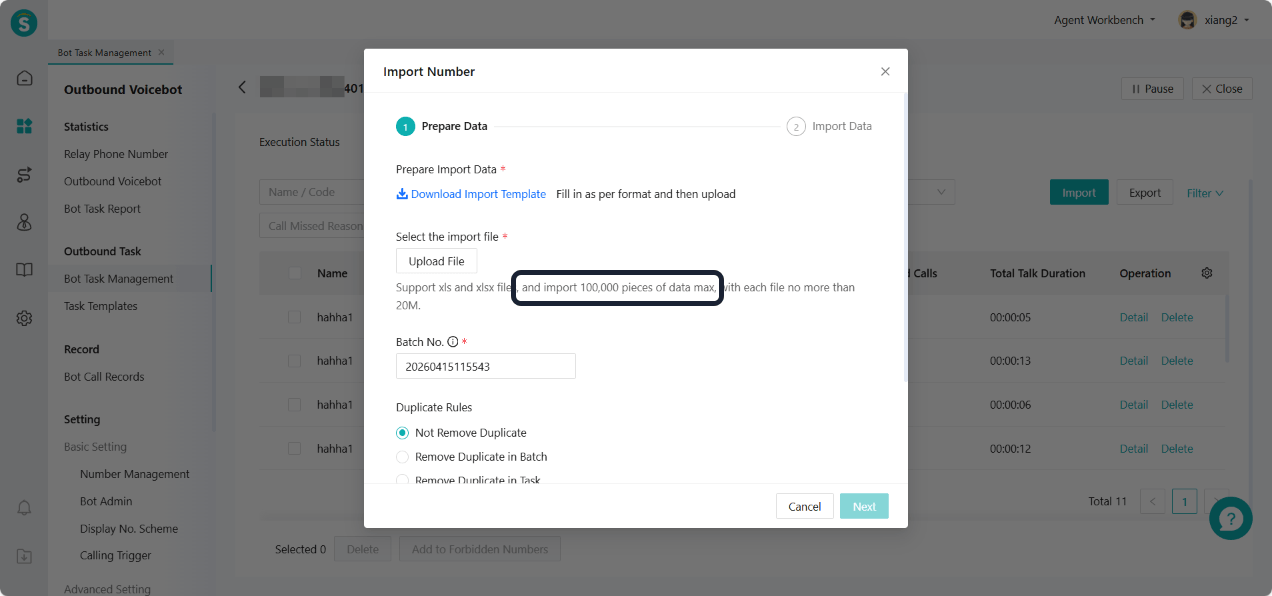
Bot Outbound Task Single Import Supports 100,000+ Data
Function Background
In large-scale outbound call scenarios (such as marketing campaigns, customer follow-ups, and satisfaction surveys), enterprises often need to import hundreds of thousands of contact data entries at once. Previously, due to the limit on the maximum number of imports, enterprises had to import data in multiple batches, which was cumbersome and time-consuming, affecting the efficiency of task distribution.
Function Description
Optimize the data import capability for outbound call tasks. A single task supports importing up to 100,000 data entries.
The system processes imported files in batches and parses them asynchronously, avoiding page timeouts or lag caused by large amounts of data. Enterprises can complete the upload of large-scale outbound call lists and task creation in one go, significantly improving operational efficiency in batch outbound call scenarios.
Live Chat
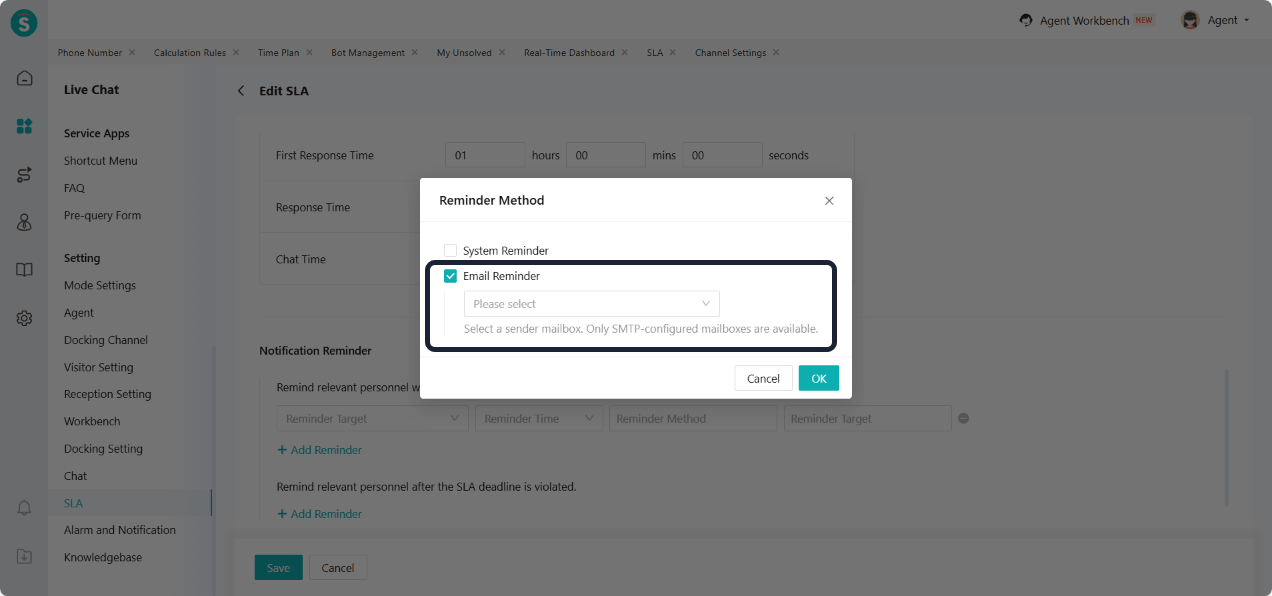
SLA Email Reminder Only Support Email Using SMTP
Function Description
SLA email notifications now only support using an email account with configured SMTP as the sender mailbox:
When configuring SLA email notifications, enterprise must select a valid SMTP email account.
The SLA email notifications configured in the past will remain in their original sending method to ensure business continuity.
When editing the historical SLA task, enterprise need to reassign a valid SMTP email address to save the configuration.
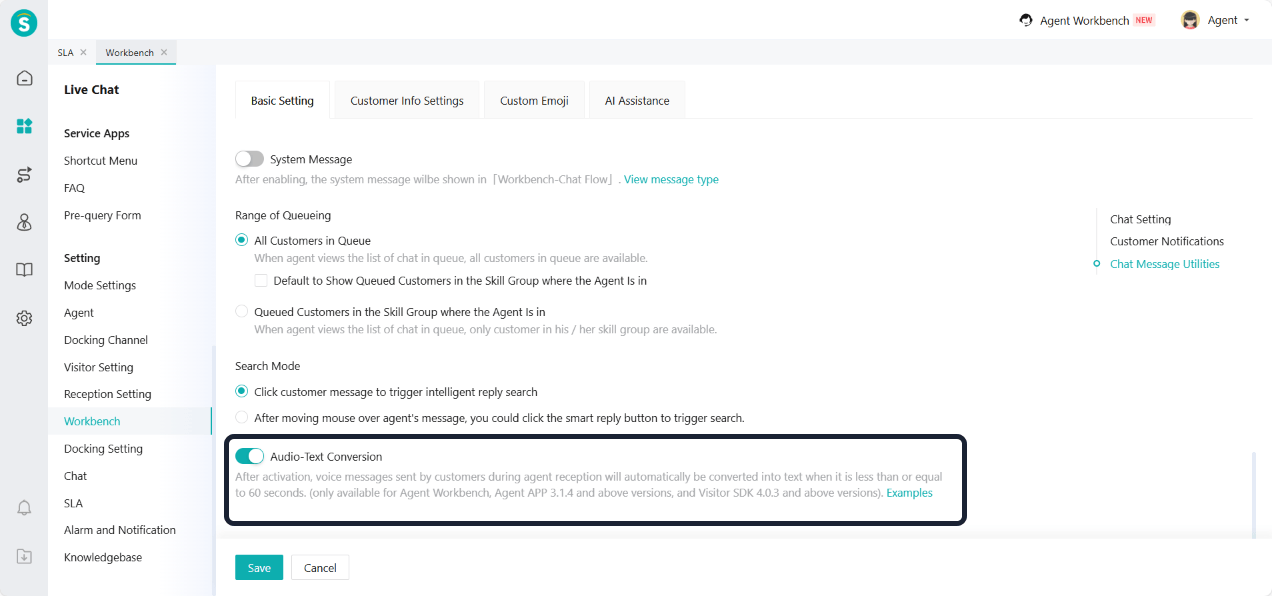
Audio-Text Conversion Rule Adjustment
Function Background
Previously, the audio-text conversion function only supported specific channels, which limited the ability to process voice content in some scenarios. To improve the general processing efficiency of voice messages, this optimization adjusts the transcription rules and expands the range of supported transcriptions.
Function Description
The rule for audio-text conversion has been updated to support the transcription of all voice messages with a duration of 60 seconds or less, without any limitations on channel type.
Timeout Statement Position Adjustment
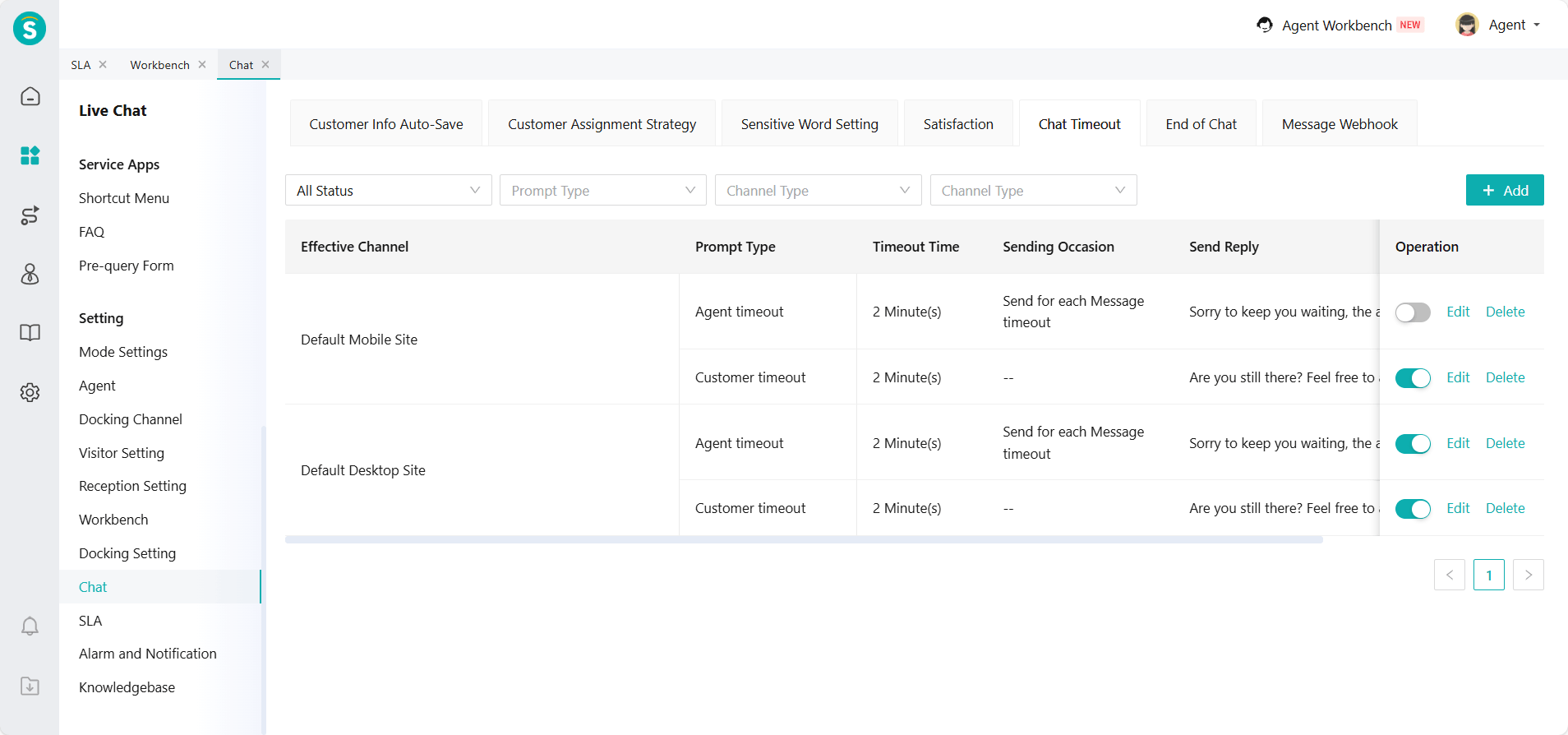
Function Description
To optimize the product feature structure, the configuration location for timeout statement setting has been moved from "SLA - Settings - Timeout Statement Setting" to "Chat - Chat Timeout". Enterprises can now configure related messages and timeout rules on the chat timeout settings page.
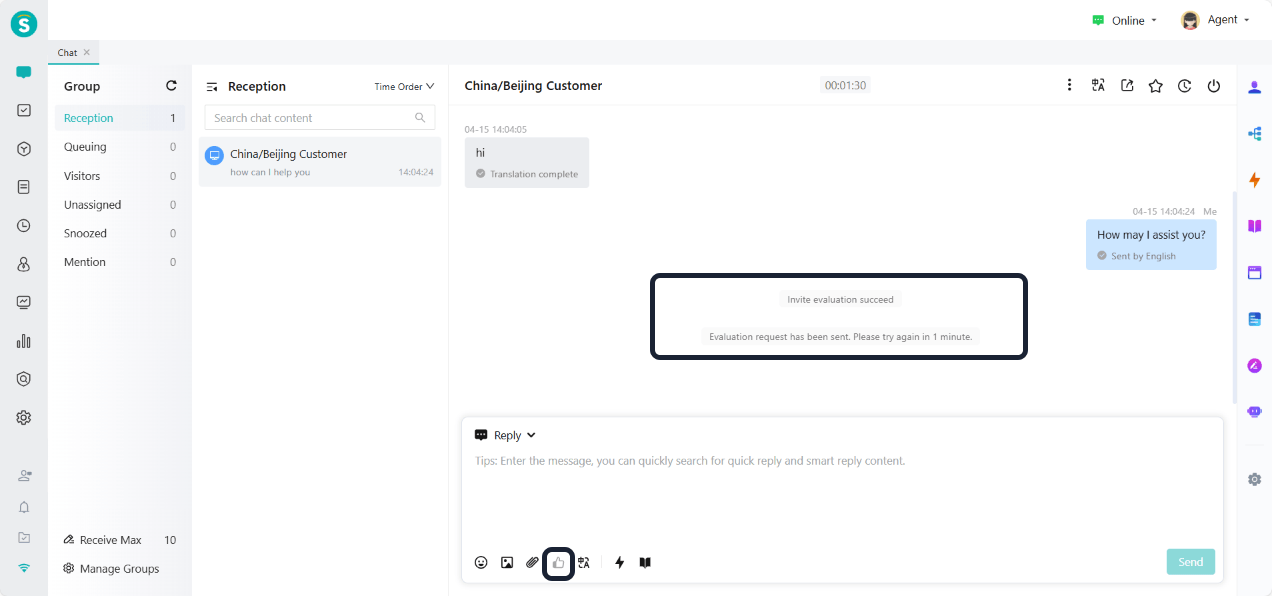
Frequency Limit Added for Clicking Invitation Evaluation in Agent Workbench
Function Background
Accidentally clicking the invitation button during a conversation may cause the system to repeatedly send invitation pop-ups to customers, affecting their experience. To avoid such situations, this update adds a frequency limit to the invitation operation, ensuring customers will not receive repeated invitations.
Function Description
In the agent workbench and agent APP, after the agent successfully sends an evaluation invitation to the customer, it is unable to initiate another evaluation request within 1 minute. This effectively prevents repeated evaluation invitations caused by accidental touches, improving the customer experience.
Chat Record Export Supports Rich Text Card Content
Function Description
The chat record export function now supports exporting card-type rich text content. Enterprises can fully obtain chat data containing rich text cards, ensuring the integrity of data analysis and a smooth transition between old and new versions.
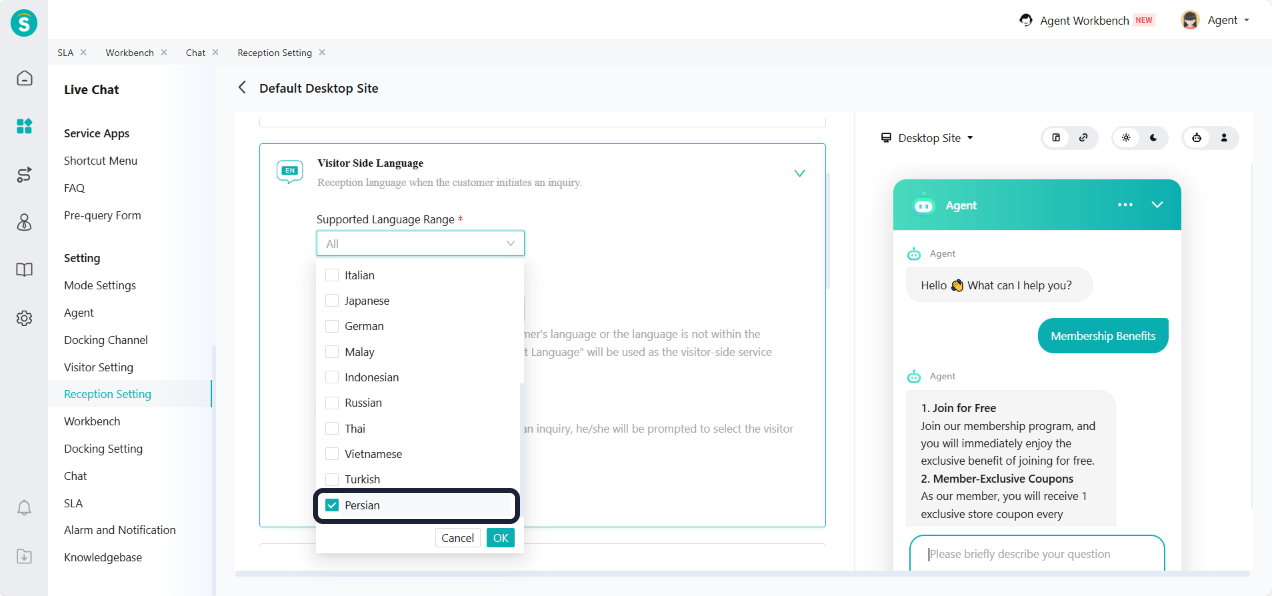
Persian Language Added to Visitor Side
Function Description
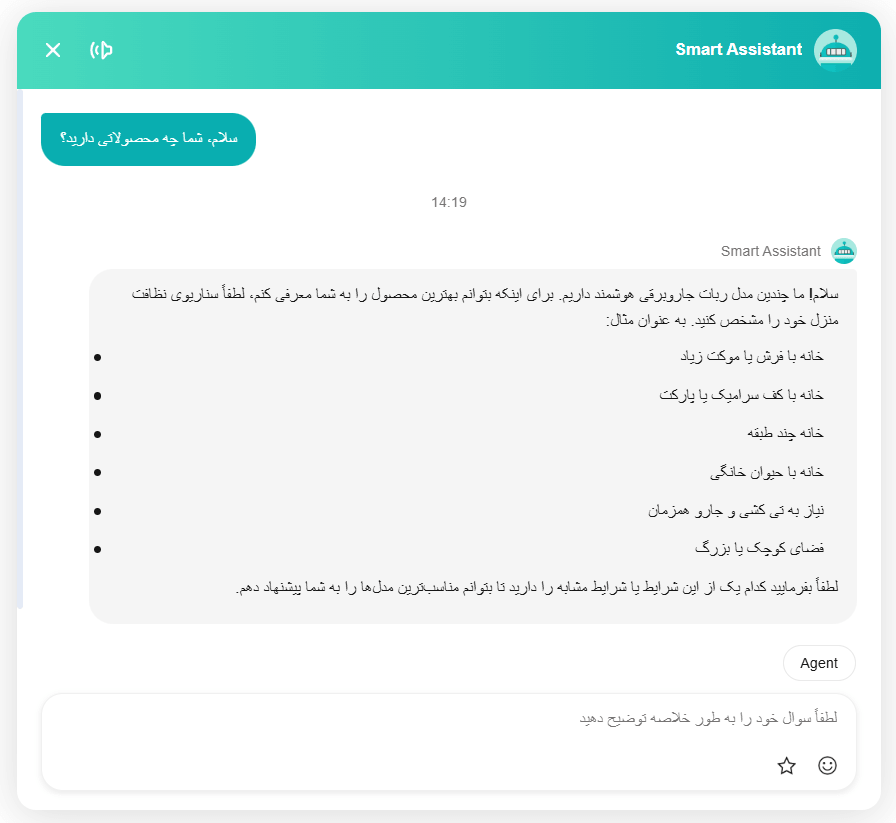
The visitor side has added Persian language support. Meanwhile, the visitor side language, intelligent routing allocation, and translation-related features have all been adapted. Persian, like Arabic, belongs to the language system that reads from right to left.
Note: The ticket plug-in does not yet support Persian language adaptation.
Pre-Query Form Configuration
Function Description
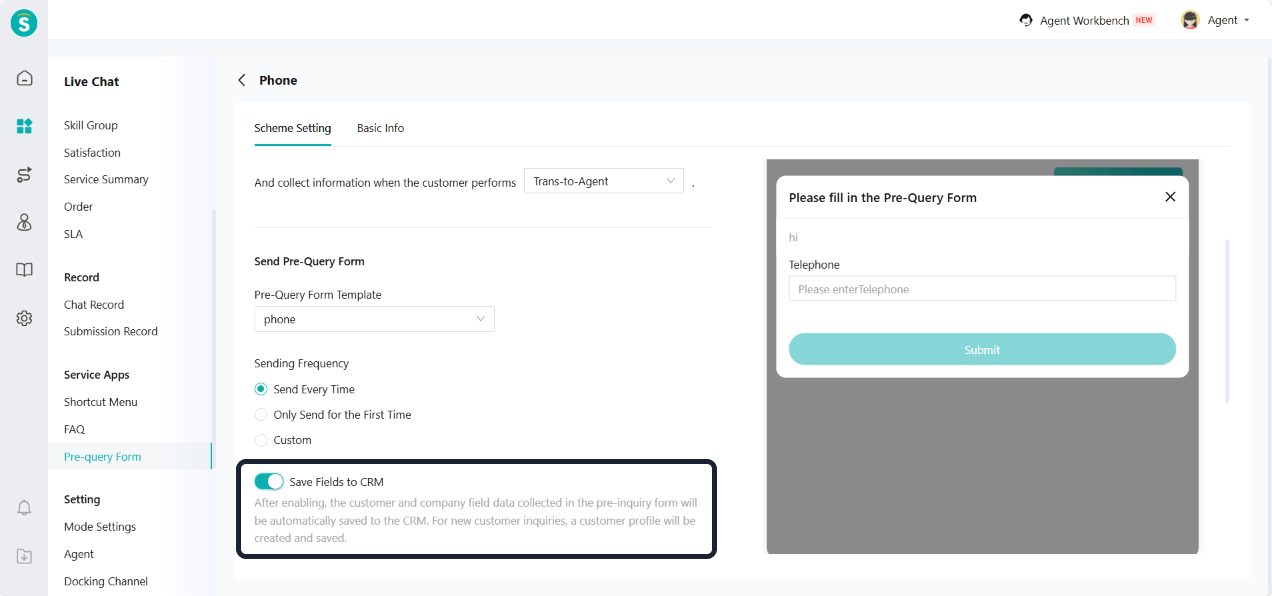
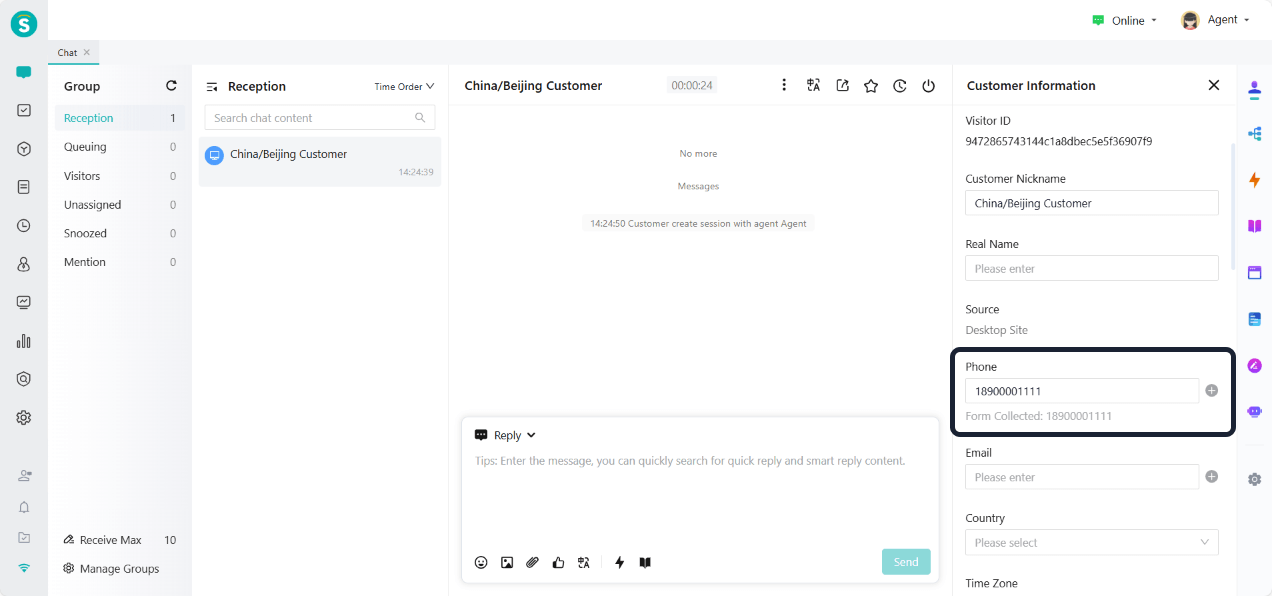
Service Apps - Pre-query Form - Pre-query Form Scheme add a "Save Fields to CRM" switch. When turned on, the customer and company field data collected in the pre-query form will be automatically saved to the CRM. Enterprises can flexibly configure whether to enable this function based on business needs, meeting the requirements of CRM data synchronization scenarios.
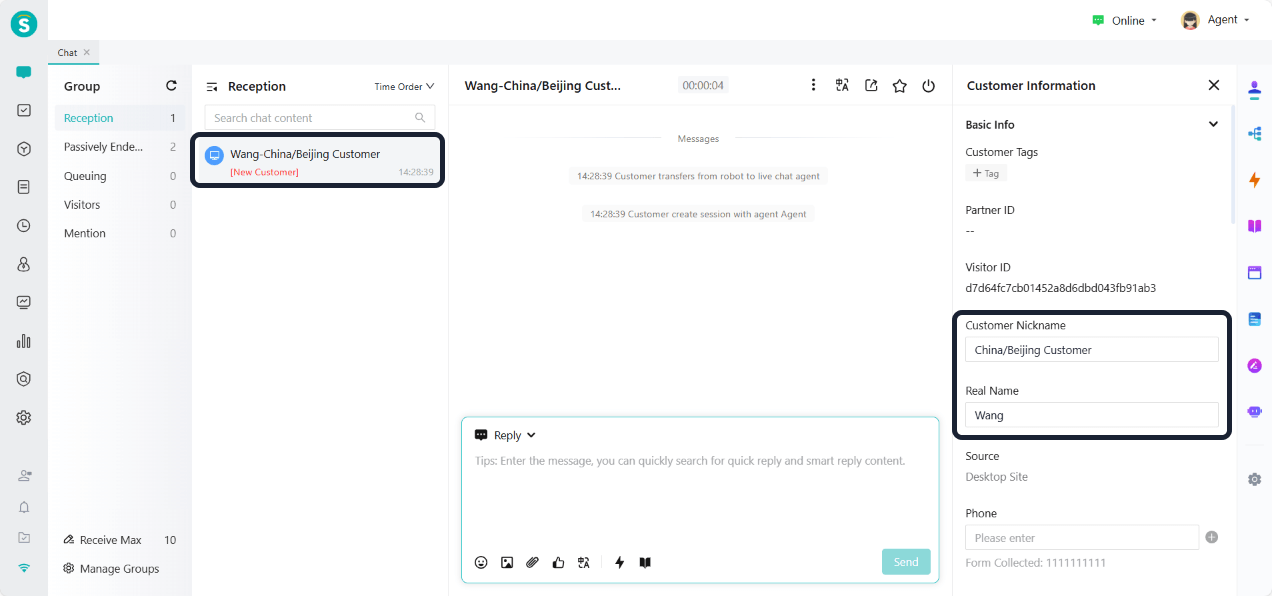
Agent Workbench Chat List Shows Customer Real Name
Function Background
For customers who already exist in the CRM and have their real names recorded, agent cannot directly identify customer identity information in the chat list. This affects service efficiency and customer experience.
Function Description
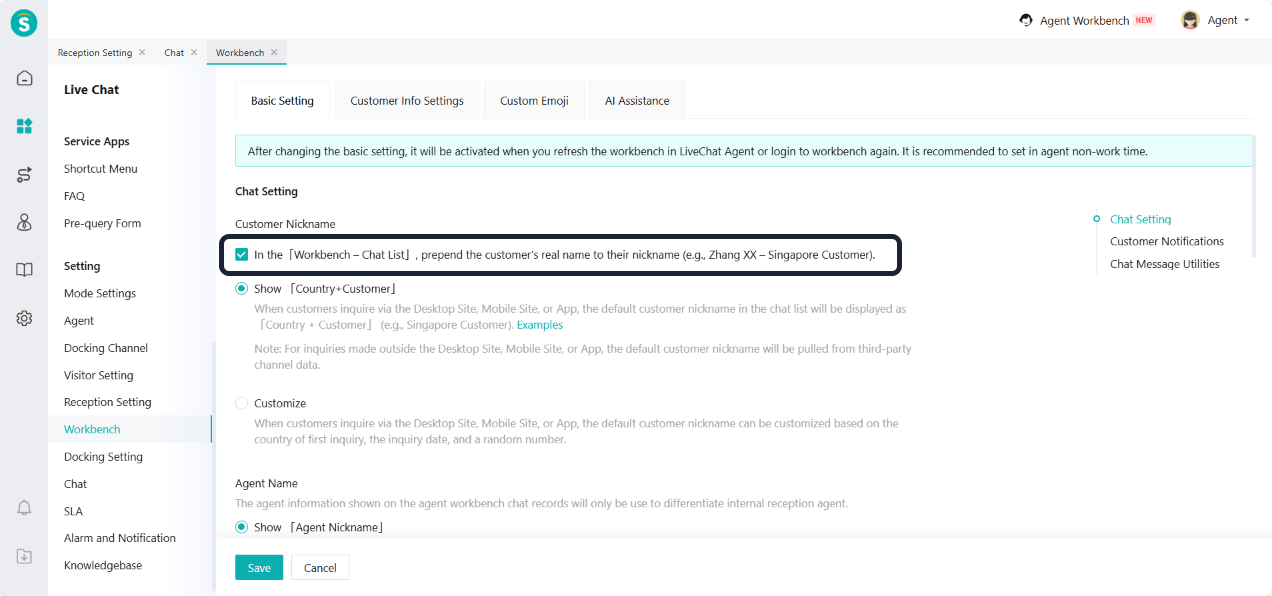
Setting - Workbench - Basic Setting - Chat Setting add "In the「Workbench -- Chat List」, prepend the customer's real name to their nickname". After checking, the chat list in the agent workbench will display in the format of "Customer Nickname - Real Name", making it easier for chat to quickly identify customer identities.
Snoozed Chats Support Batch Transfer
Function Background
In always on mode, snoozed chats cannot be directly handled by other agents. When the original agent is on break or during shift change, agent from other teams cannot view or reply to snoozed chats, affecting the continuity of customer service.
Function Description
In always on mode, snoozed chats support batch transfer function. Transfers can be completed without lifting the snoozed status.
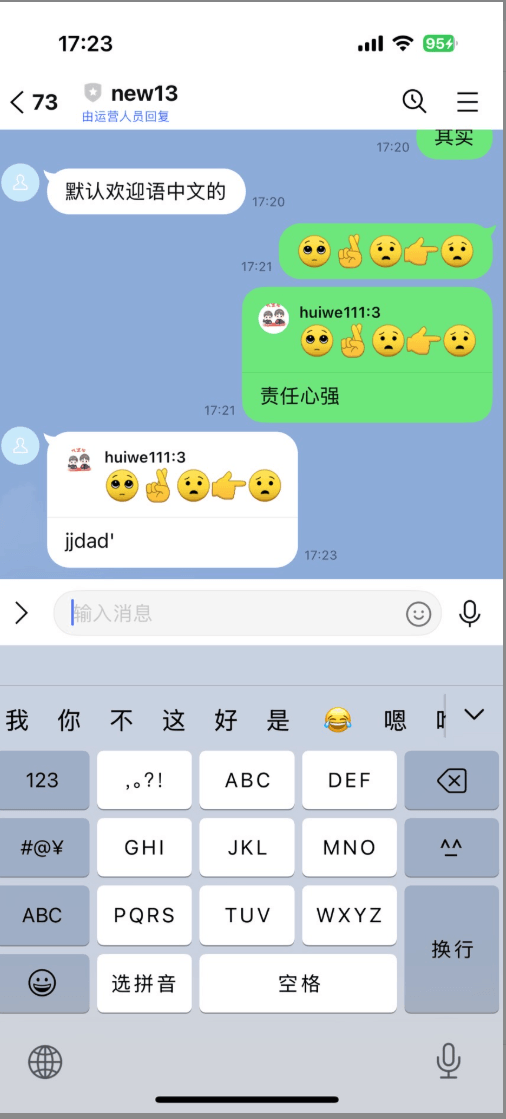
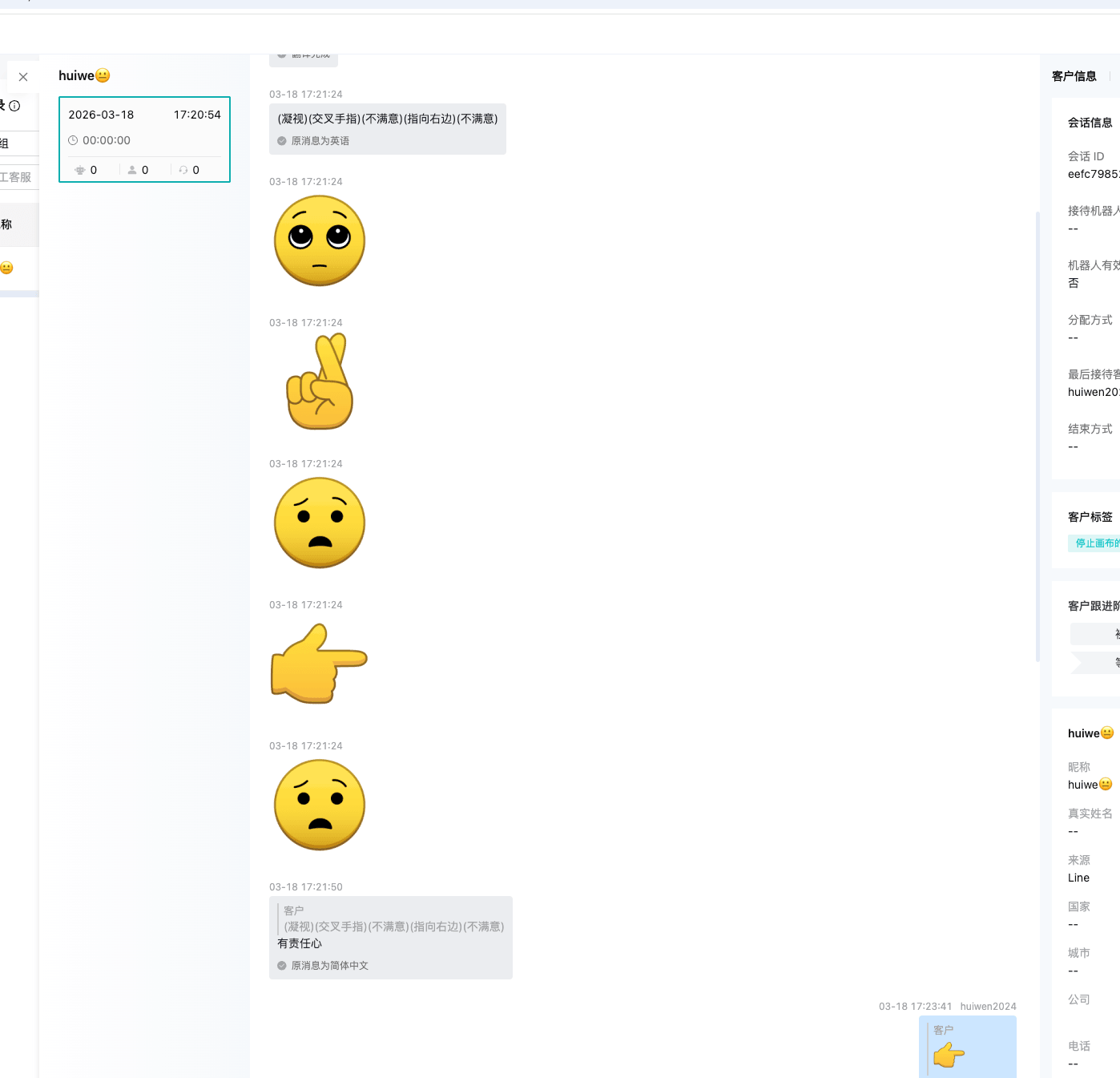
LINE Channel Supports Viewing Emojis Sent by Customers
Function Description
Web-JS Access Adds API to Check If Chat Has Ended
Function Description
For enterprises that need to build their own inbound logic, adding this API can support such requirements.
Web-JS Access Description | Developer Documentation
Online Message Forwarding API Optimizes Chat End Method
Function Description
The way a chat ends in the online message forwarding is consistent with what is displayed in the chat records on the Console page.
Online Message Forwarding API | Developer Documentation
Ticketing
Agent Workload Metrics
Function Description
To make the metrics more aligned with actual business logic, the following optimizations have been made in this phase:
"Processed Tickets" is renamed to "Resolve Tickets".
"Tickets Participated in Handling" is renamed to "Assist Tickets".
Added the "Handled Tickets" metric: Count the number of unique valid tickets after agent performs operations such as "create, edit, reply, rollback node, complete node, close, activate" on tickets.
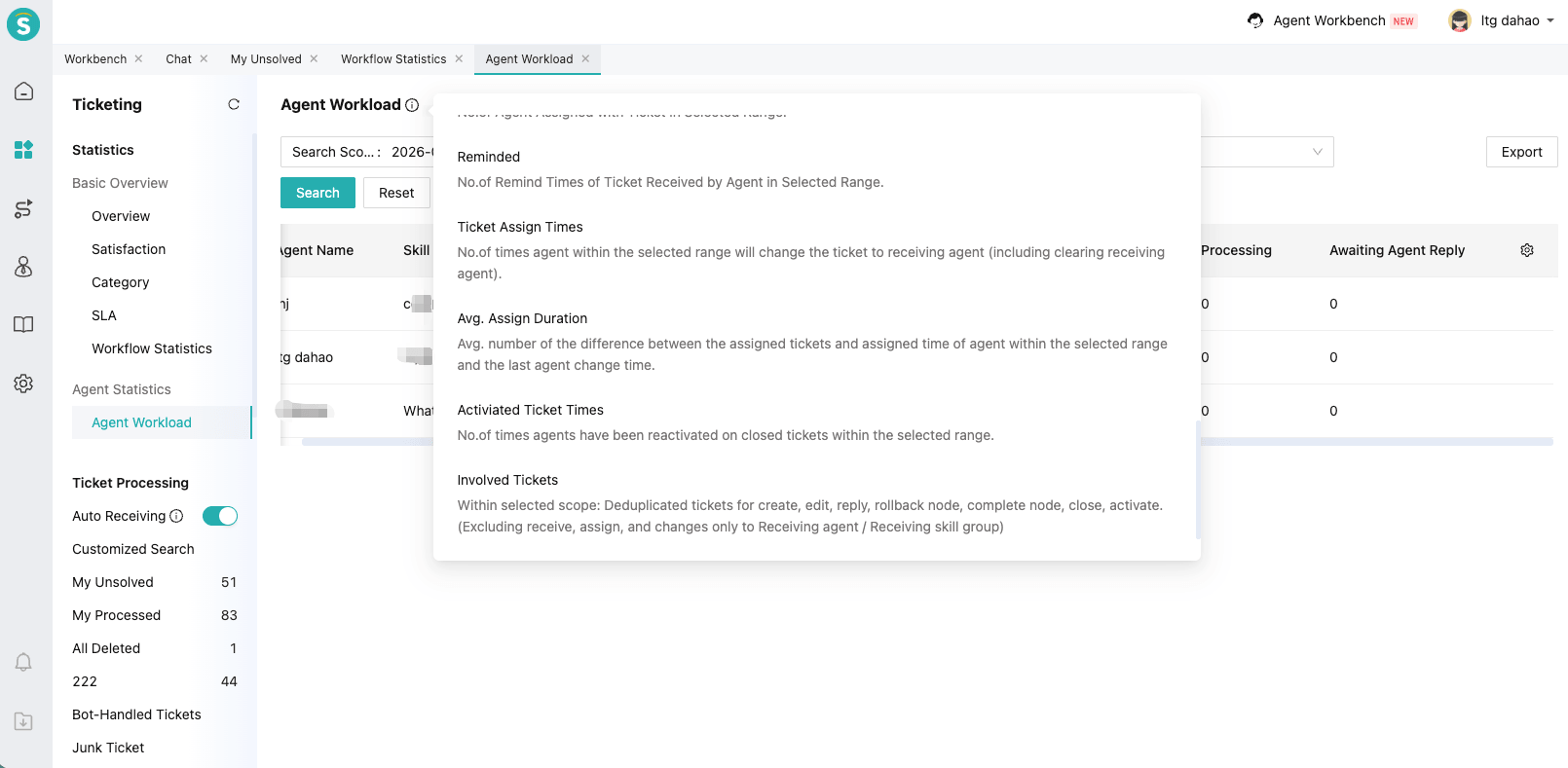
Note: The following are operations not included in the statistics (strict verification):
Only click the "Receive" and "Assign" buttons, with no other actions taken.
Only modify "Receiving Agent / Receiving Skill Group" (excluding other fields, categories, and template editing).
Excel batch edit any content.
English Notification Sound for Ticket Browser Reminder
Function Description
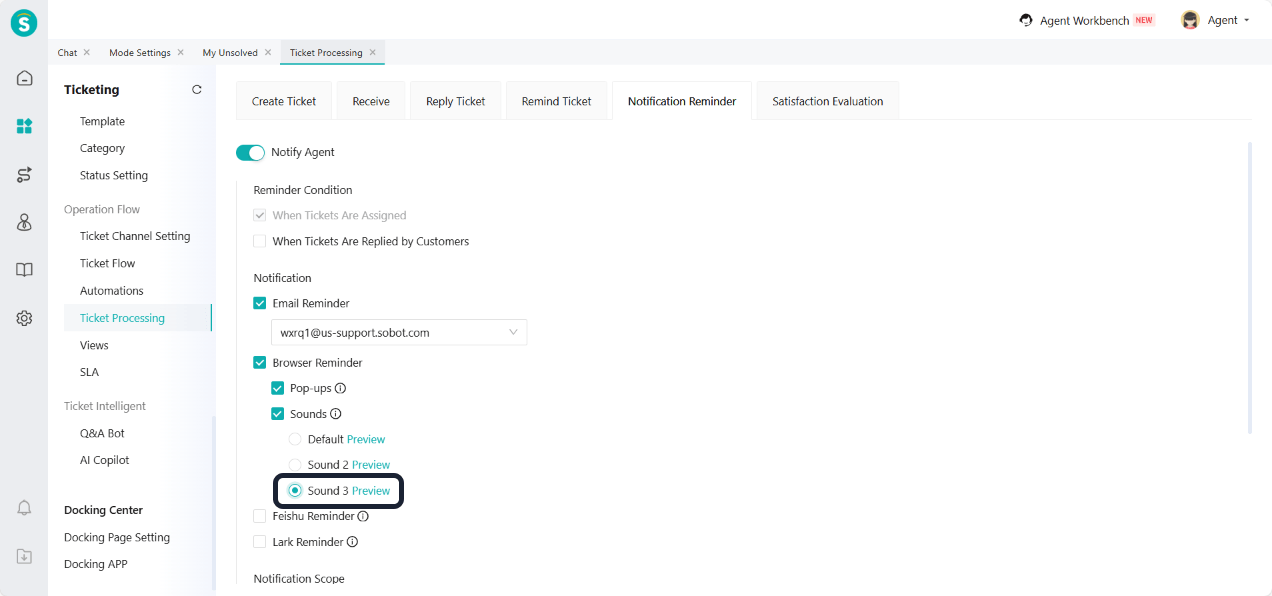
Business Rules - Ticket Processing - Notification Reminder - Notify Agent - Browser Reminder Add new english notification sound (Sound 3).
Email Replies Support Emojis
Function Description
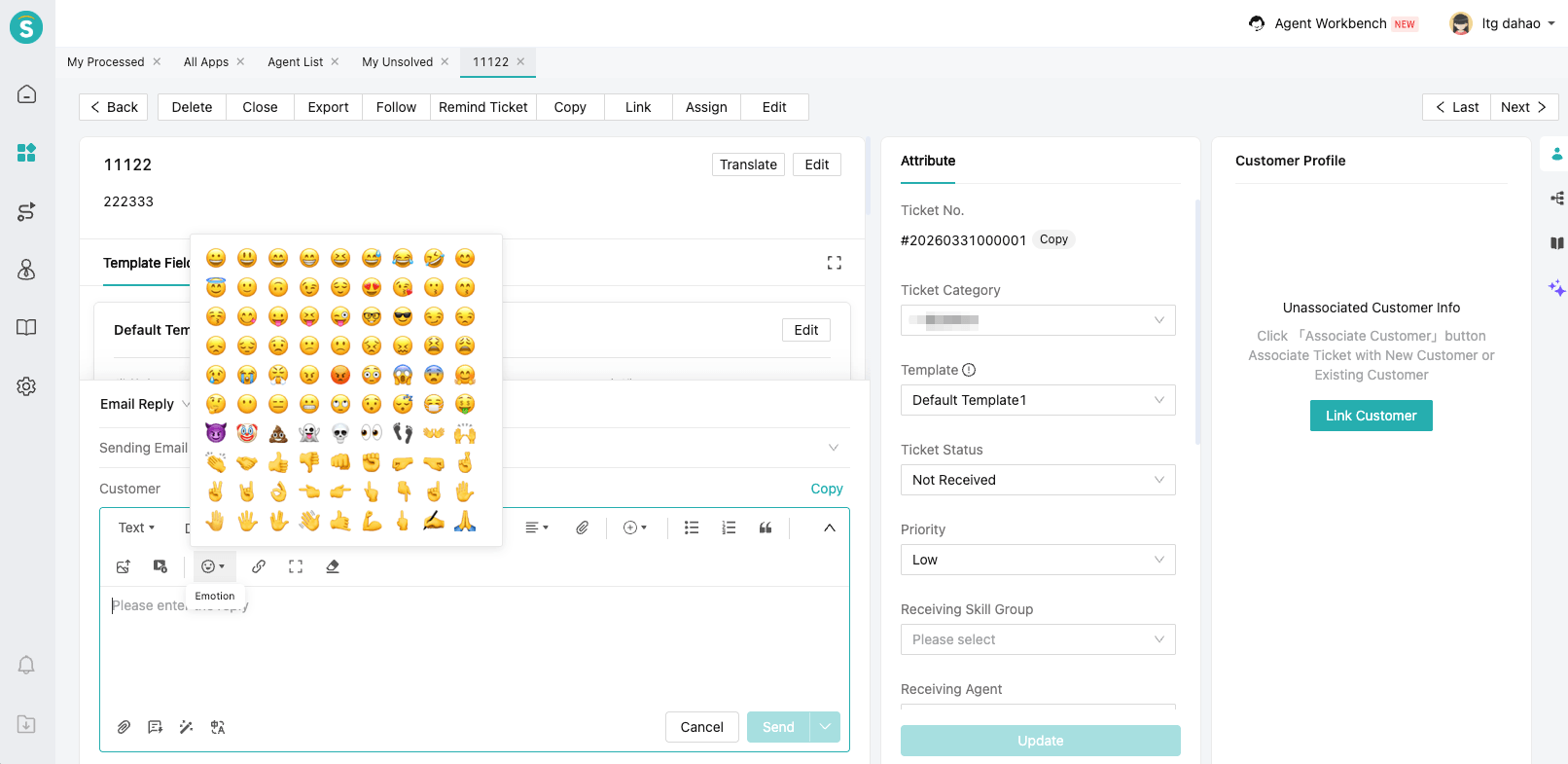
Mail replies in scenarios such as ticket flow settings, ticket email reply, automations settings, and batch email replies all support the emoji function, enhancing the warmth and expressiveness of email communication.
Email Template Signature Supports 3000 Characters in Length
Function Description
Ticket Auto-Assignment Optimization
Function Background
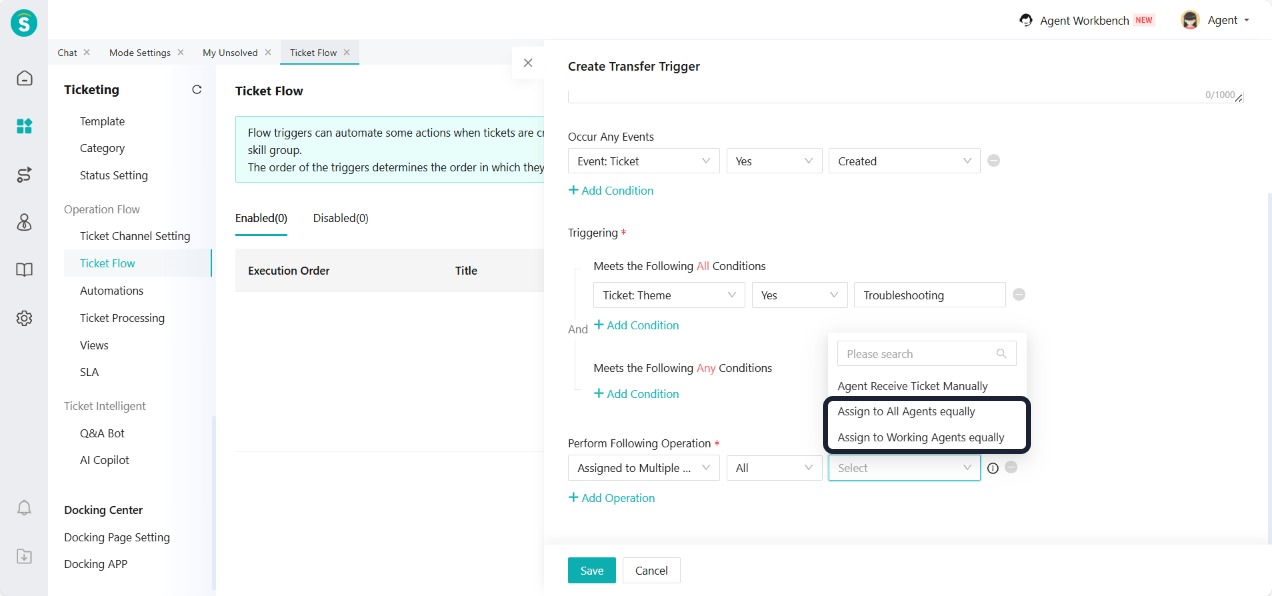
The existing automatic ticket assignment mechanism has an issue of uneven distribution. When some agents reach their handling capacity limit or turn off automatic order acceptance, the system still tries to assign tickets or restarts the assignment from the beginning. This causes other agents to be overloaded.
Function Description
The automatic ticket allocation logic has been optimized as follows:
In the strategies of "Assign to All Agents Equally" and "Assign to Working Agents Equally", add a "Receiving Limit" check for agents. Agents who reach the limit will no longer receive new tickets.
During the ticket assignment process, if an agent turns off "Auto Receiving", the system will skip that agent and continue to assign the ticket to the next agent, instead of restarting the assignment from the beginning. This approach helps resolve the issue of uneven ticket distribution to a certain extent.
App Center
Lark
Function Description
This version enables viewing and processing tickets within Lark. For integration and usage details, see the Usage Description of Lark Docking .
CRM
Customer Assignment Rule Supports Assigning to the Creator
Function Description
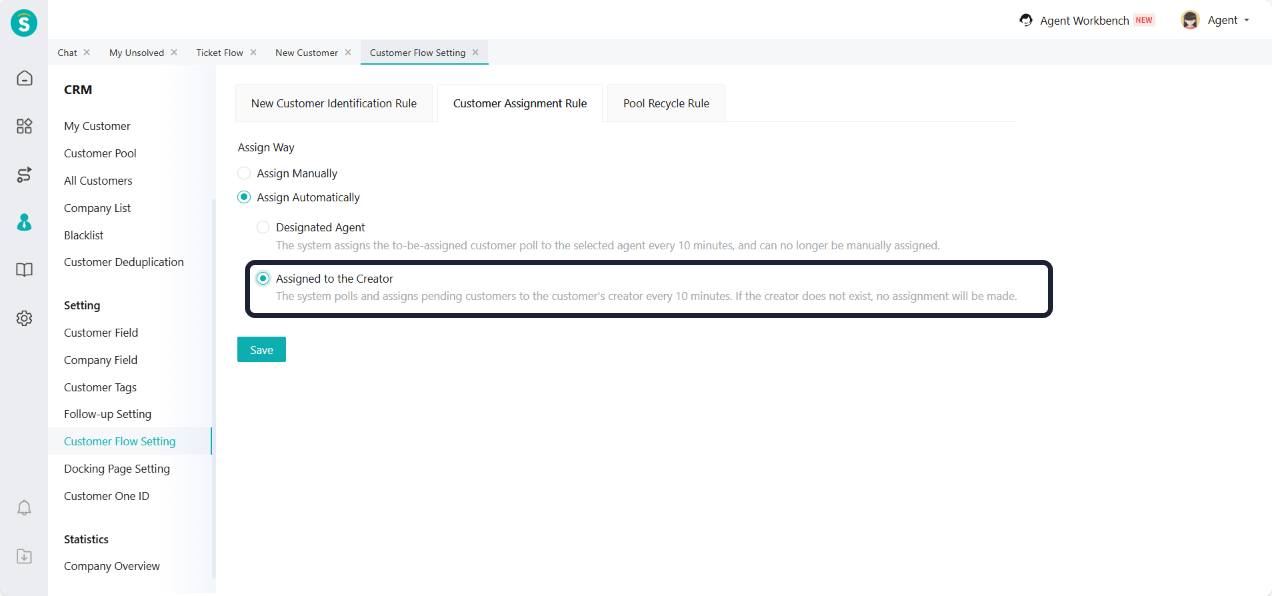
Customer Flow Setting - Customer Assignment Rule - Assign Automatically add "Assigned to the Creator". If the customer's creator does not exist (e.g., auto-saved customers) or the creator's account has been deactivated, no further assignment will be made.
Admin Center
API Management Supports Using Dynamic Token
Function Background
To improve the security of API calls, it is necessary to add a more flexible dynamic Token authentication method on top of the existing static Token.
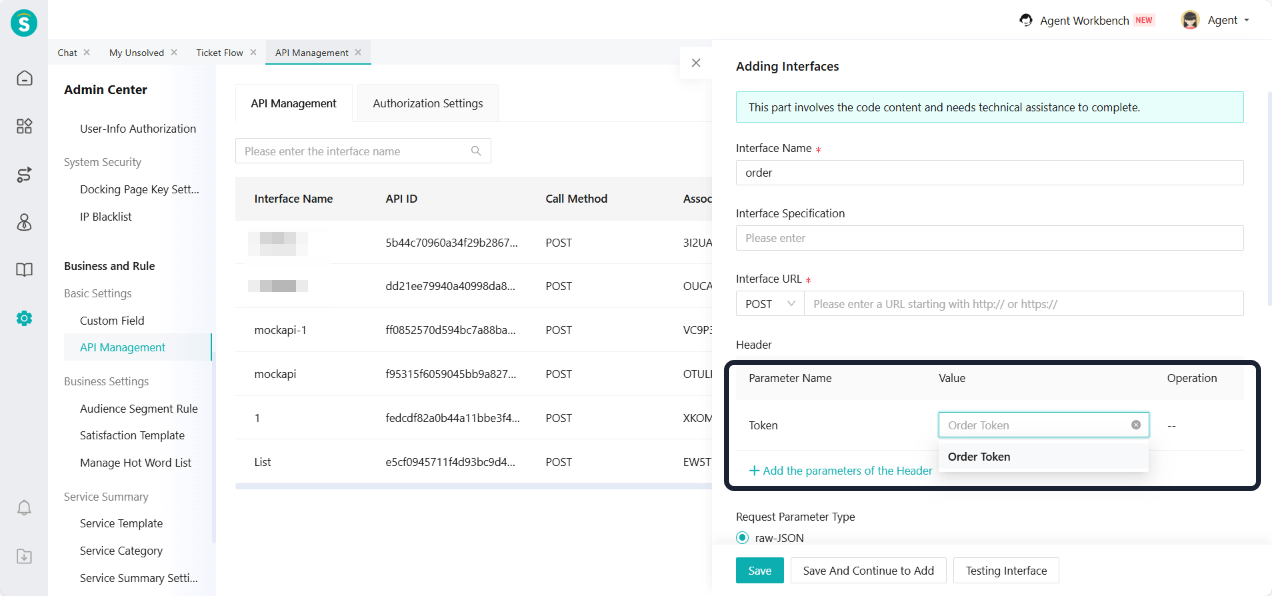
Function Description
- Enterprises can go to API Management - Authorization Settings to add dynamic Tokens. For specific generation and refresh methods, see the API Management | Product Documentation.
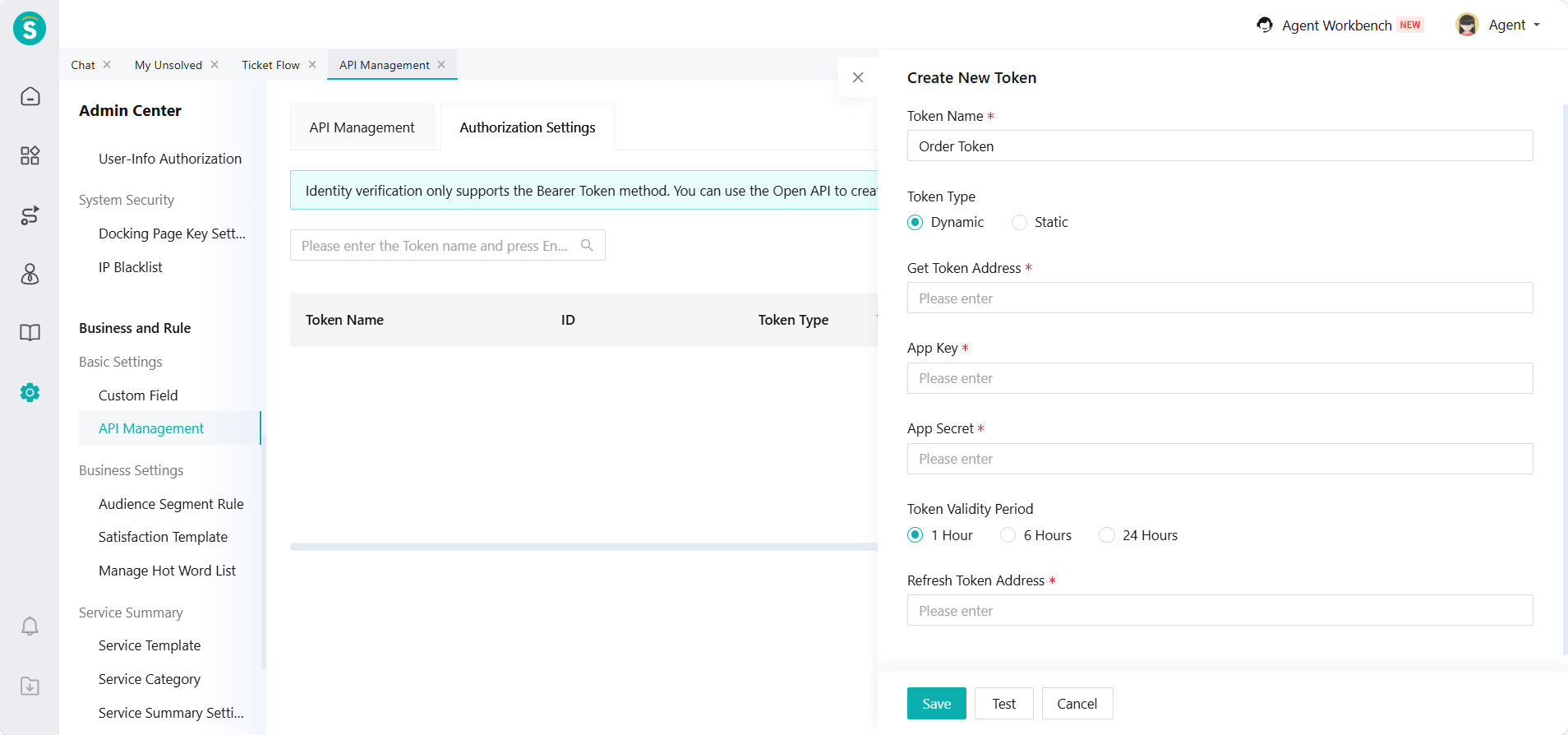
- After creating the Token, the enterprise can select the already created Token when creating an interface in API Management.
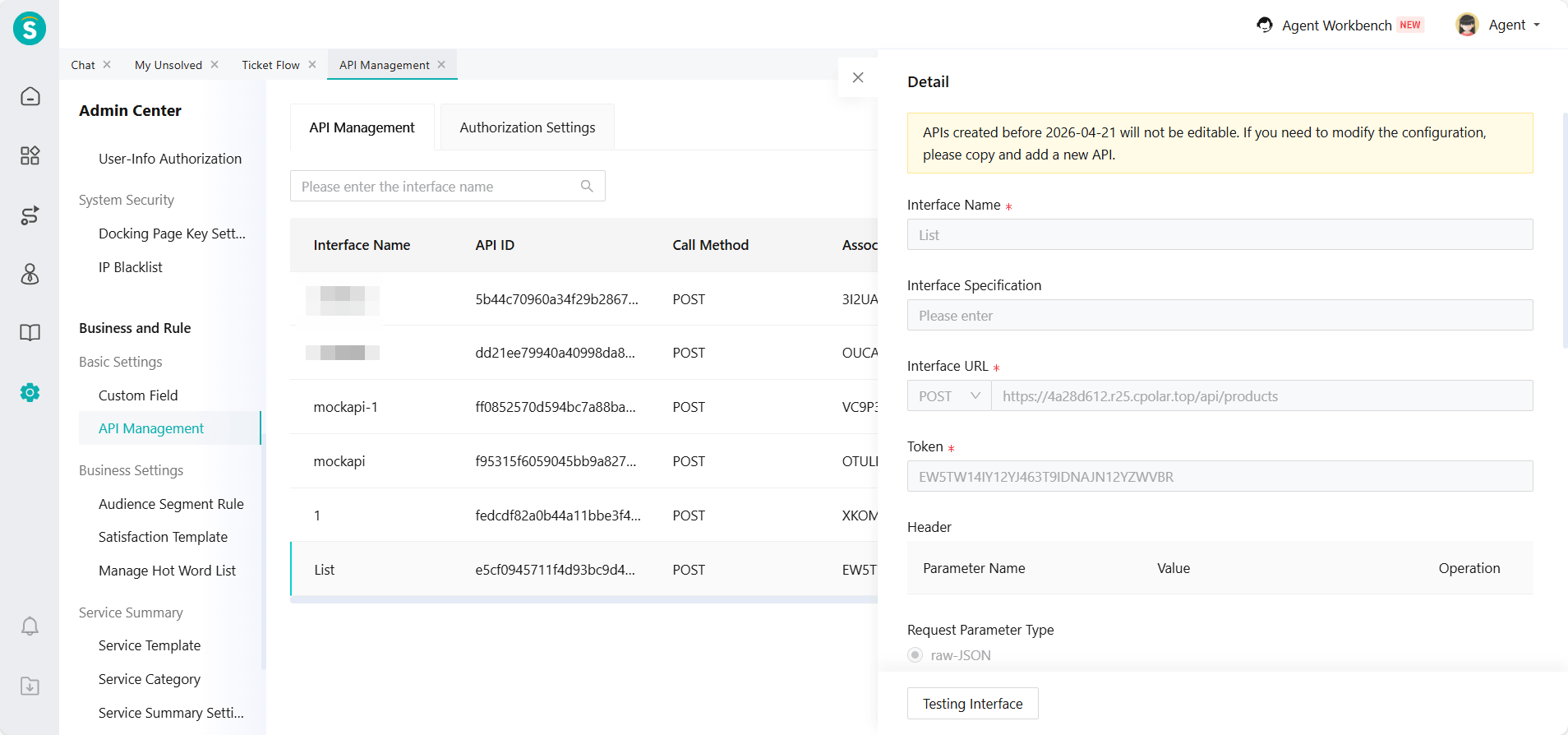
Note: Historical interfaces created before this version can still be used, but cannot be edited again.
APP
Call Operation Now Supports Transfer to Third-Party Number
Function Background
In actual business scenarios, some incoming calls need to be transferred to third-party personnel outside the system (such as external partners, remote branches, or on-duty mobile phones). The current system only supports internal transfers, making business handling less flexible.
Function Description
During the telephone reception process, the transfer operation has a new "third-party number" option. This allows agent to transfer the current call to an external phone number. The system automatically completes the call connection and associates the calls to ensure service continuity.
Highlighting Sensitive Words in the Online Workbench
Function Description
When a customer message triggers the sensitive word rule, the relevant sensitive words will be highlighted in the chat. This makes it easy for agent to quickly identify and respond.
Note: This version only supports iOS. The Android version will be adapted in the next version.