
Agent Performance
# Agent Performance
——This article helps you understand what the Agent Performance does, along with how to use global filtering, the conversation flow chart, core metrics, conversation details, metric definitions, and more.
Entry: Data › Dashboards › Agent Performance.
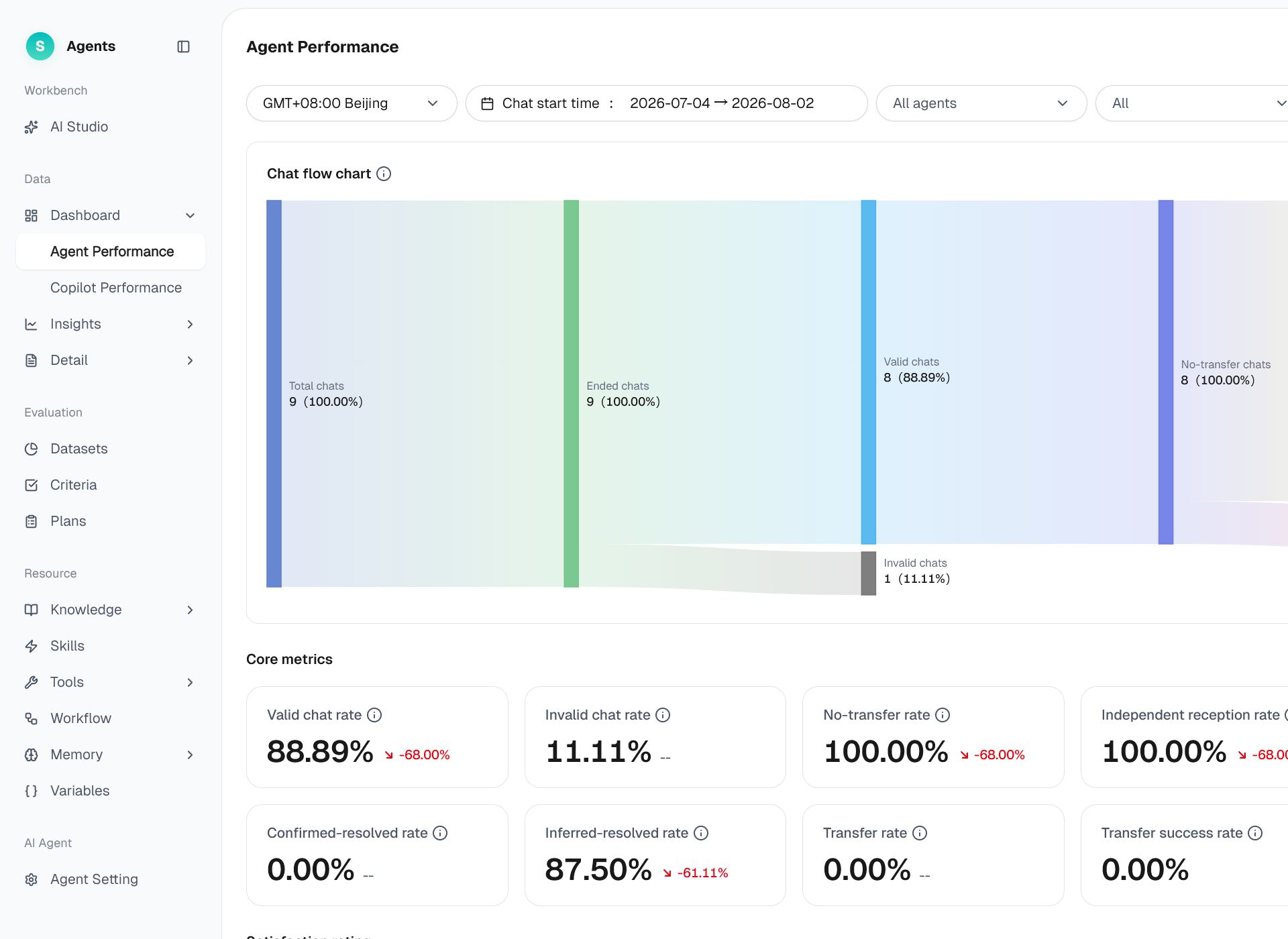
Figure 1: Agent Performance
# Agent Performance Overview
Before using the Agent Performance, familiarize yourself with its use case and purpose:
- Use case: Regularly review the overall performance of customer-facing bots and monitor changes in key metrics such as conversation effectiveness, transfers to human agents, resolution rates, and customer satisfaction.
- Purpose: Use a single dashboard to understand how conversations flow, review core metrics, identify daily fluctuations, and detect performance drift promptly.
# How to Use the Conversation Dashboard
# • Global Filter Bar
Use the filter bar at the top to set the following conditions. Click Search to apply the filters or Reset to restore the defaults:
- Time zone: GMT+8:00 Beijing by default.
- Conversation start time: The last 7 days by default, with a maximum range of 180 days.
- Bot: All bots by default. Multi-select and search are supported.
- Business type / Channel type / Consultation channel: All values by default. Consultation channel options depend on the selected channel type.
- Conversation status: All statuses by default. You can select In Progress or Ended.
# • Conversation Flow Chart
A Sankey diagram shows how conversations flow from Total Conversations to Ended or In Progress, and then into stages such as Effective or Ineffective, Human Transfer Not Triggered or Human Transfer Triggered, and Resolved or Unresolved. Hover over a node or path to view its count and percentage. Nodes with a value of 0 are not displayed.
# • Core Metrics
Core metrics are grouped by theme: Effectiveness, Resolution, Human Transfer, and Satisfaction. Each metric card displays the current value and its period-over-period comparison. Hover over ⓘ to view the metric definition. When no data is available, the card displays "--".
# • Conversation Details
Below the dashboard, a conversation details table displays data by date with 24 columns shown by default. Use the gear icon to select fields by Conversation Overview, Human Transfer, or Satisfaction, and drag fields to reorder them. The Date column is fixed. You can also export the data as an XLSX file.
# Core Metric Definitions
Data scope: total conversations / in-progress conversations include in-progress conversations; all other metrics are calculated for ended conversations; conversations where the visitor said nothing and there was no human transfer are not counted.
# • Count Metrics
- Total conversations: The total number of conversations involving a bot. Total conversations = ended conversations + in-progress conversations.
- Ended conversations: The number of completed conversations handled by a bot. Ended conversations = effective conversations + ineffective conversations.
- In-progress conversations: The number of conversations that a bot is still handling.
- Effective conversations: Conversations in which an interaction occurred during the bot stage and the first message did not trigger a transfer-to-human rule.
- Ineffective conversations: Conversations transferred to a human before any interaction occurred during the bot stage, or whose first message triggered any transfer-to-human rule.
- Human transfer not triggered: Effective conversations in which no transfer to a human was triggered during the bot stage.
- Human transfer triggered: Effective conversations in which a transfer to a human was triggered during the bot stage, regardless of whether the transfer succeeded.
- Resolved: Resolved conversations = confirmed resolved conversations + inferred resolved conversations.
- Unresolved: Effective conversations that were not transferred to a human and in which the visitor disliked an answer, expressed negative sentiment, gave a negative satisfaction rating, or performed another negative action.
- Successful human transfers: Effective conversations in which a transfer to a human was triggered and completed successfully during the bot stage.
- Failed human transfers: Effective conversations in which a transfer to a human was triggered but failed during the bot stage.
- Confirmed resolved: Effective conversations that were not transferred to a human and in which the visitor liked an answer, expressed positive sentiment, gave a positive satisfaction rating, or performed another positive action.
- Inferred resolved: Effective conversations that were not transferred to a human and in which the visitor provided no likes, dislikes, sentiment, satisfaction rating, or other feedback.
# • Ratio Metrics
- Effective conversation rate: Effective conversations / ended conversations. Higher is better.
- Ineffective conversation rate: Ineffective conversations / ended conversations. Lower is better.
- Human-transfer-not-triggered rate: Human transfer not triggered / effective conversations. Higher is better.
- Independent handling rate: Independent handling conversations / effective conversations. Independent handling conversations are effective conversations that were not transferred to a human, including conversations where a transfer was not triggered and conversations where a transfer was triggered but failed.
- Resolution rate: Resolved conversations / effective conversations. Higher is better.
- Unresolved rate: Unresolved conversations / effective conversations. Lower is better.
- Confirmed / inferred resolution rate: The corresponding resolved conversation count / effective conversations. Higher is better.
- Human-transfer-triggered rate: Human transfer triggered / effective conversations. Lower is better.
- Human transfer success / failure rate: The corresponding human transfer count / effective conversations. A lower failure rate is better.
# • Satisfaction Metrics
- Satisfaction ratings: number of conversations for which the visitor gave a satisfaction rating.
- Good / neutral / bad ratings: classified by mapping ratings such as 5-star, 10-point, 2-level, resolved/unresolved, etc.
- Good / neutral / bad rating rate: corresponding rating count / satisfaction ratings.
Period-over-period comparison: The current filtered period is compared with the immediately preceding period of the same length. The comparison is not displayed if the previous value is 0, the comparison period is more than seven months ago, or the comparison period predates account activation. When a ratio's denominator is 0, "--" is displayed.