
Customer Questions
# Customer Questions
——This article helps you understand what Customer Questions does, along with how to use filtering, the question list, field configuration, question details, and one-click diagnosis.
Entry: Data › Analysis › Customer Questions.
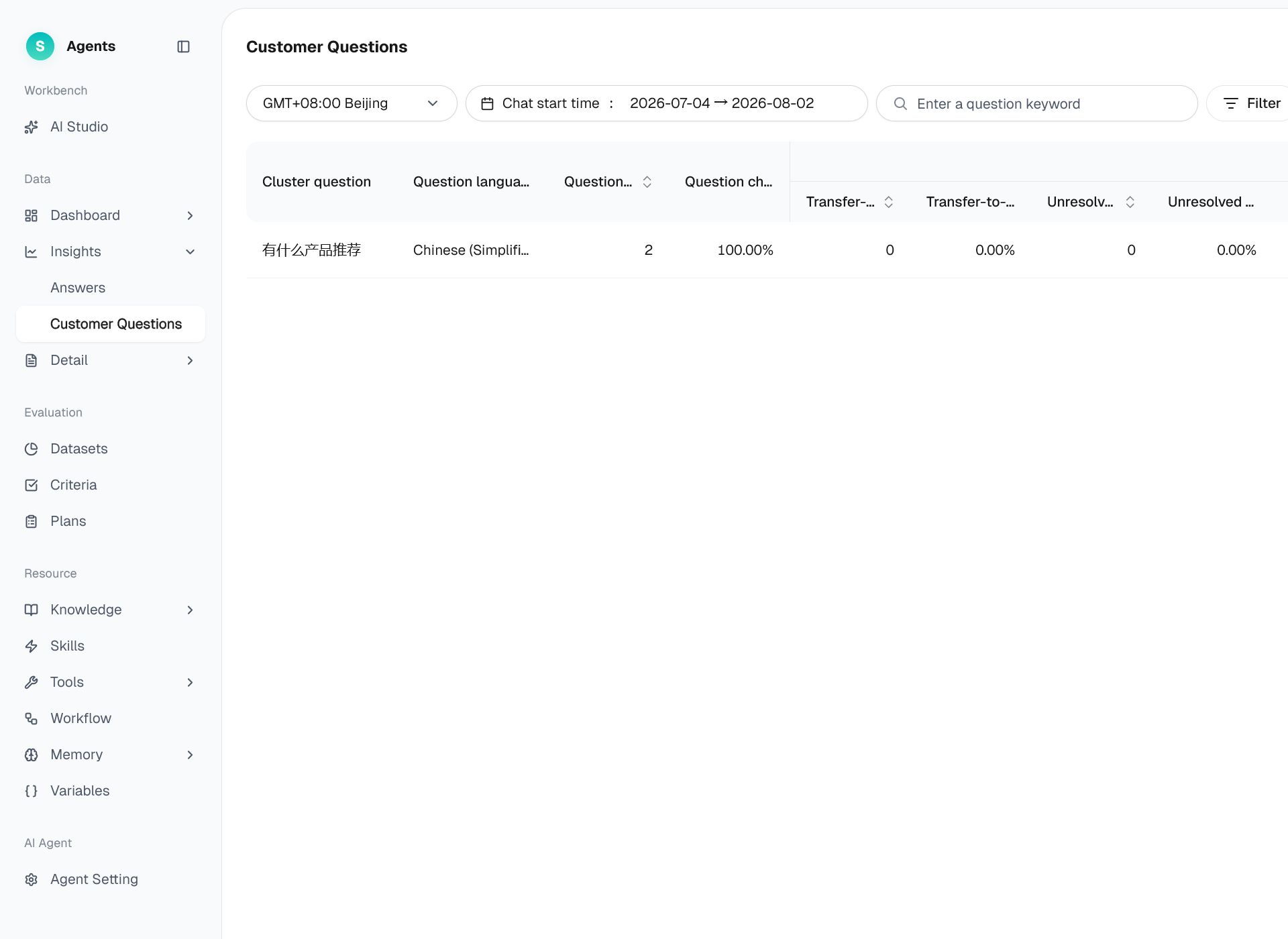
Figure 1: Customer Questions
# Customer Questions Overview
Before using Customer Questions, familiarize yourself with its use case and purpose:
- Use case: Identify the questions customers ask most frequently and the questions the bot has not resolved effectively.
- Purpose: Automatically group large volumes of customer questions into categories, identify issues based on high frequency, unresolved conversations, or numerous dislikes, and send them to AI Studio for diagnosis with one click.
# How to Use Customer Questions
# • Filtering
Filter by conversation start time, bot type, bot, business type, channel type, consultation channel, whether a transfer to a human was triggered, resolution status, answer rating, question language, and other conditions. The maximum time range is 180 days.
# • Question List
The clustered question types are shown in a list. Common columns include:
- Clustered question: The question topic generated by the clustering algorithm. Click the text to open AI Studio for optimization.
- Question conversations / percentage: The total number of conversations containing the question and its percentage of effective conversations during the selected period.
- Human transfer / independently handled conversations and percentage: The number and percentage of conversations in which the question triggered a transfer to a human or was handled independently by the bot.
- Resolved / confirmed resolved / inferred resolved / unresolved conversations and percentage: The resolution distribution for the question.
- Answer likes / dislikes / not rated: Customer feedback on answers associated with the question.
By default, the list is sorted by question conversation count in descending order. Click a column heading to switch between ascending and descending order.
# • Field Configuration and Export
- Field configuration: Click the gear icon in the upper-right corner. Select fields grouped under Basic Fields, Customer-Facing Agent, and Agent Assist, drag fields to reorder them, or restore the default configuration.
- Export: Click Export in the upper-right corner to export the filtered results as an XLSX file. The file includes conversation IDs for tracing.
# • Customer Question Details
Click Details for a question to open the conversation details page. Review all original customer questions in that category, answer content, the bot that answered, answer ratings, whether the conversation was transferred to a human and why, and the full conversation history.
# • One-Click Diagnosis
In the conversation history on the conversation details page, click AI Optimization in the lower-right corner of a message to start a diagnosis. Enter optimization instructions and click Optimize. The question and its recent conversation context are sent to AI Studio, where AI performs six-dimensional root-cause analysis and provides recommendations.