
Answers
# Answers
——This article helps you understand what Answers does, and how to use it to analyze the quality of each bot answer.
Entry: Data › Analysis › Answers.
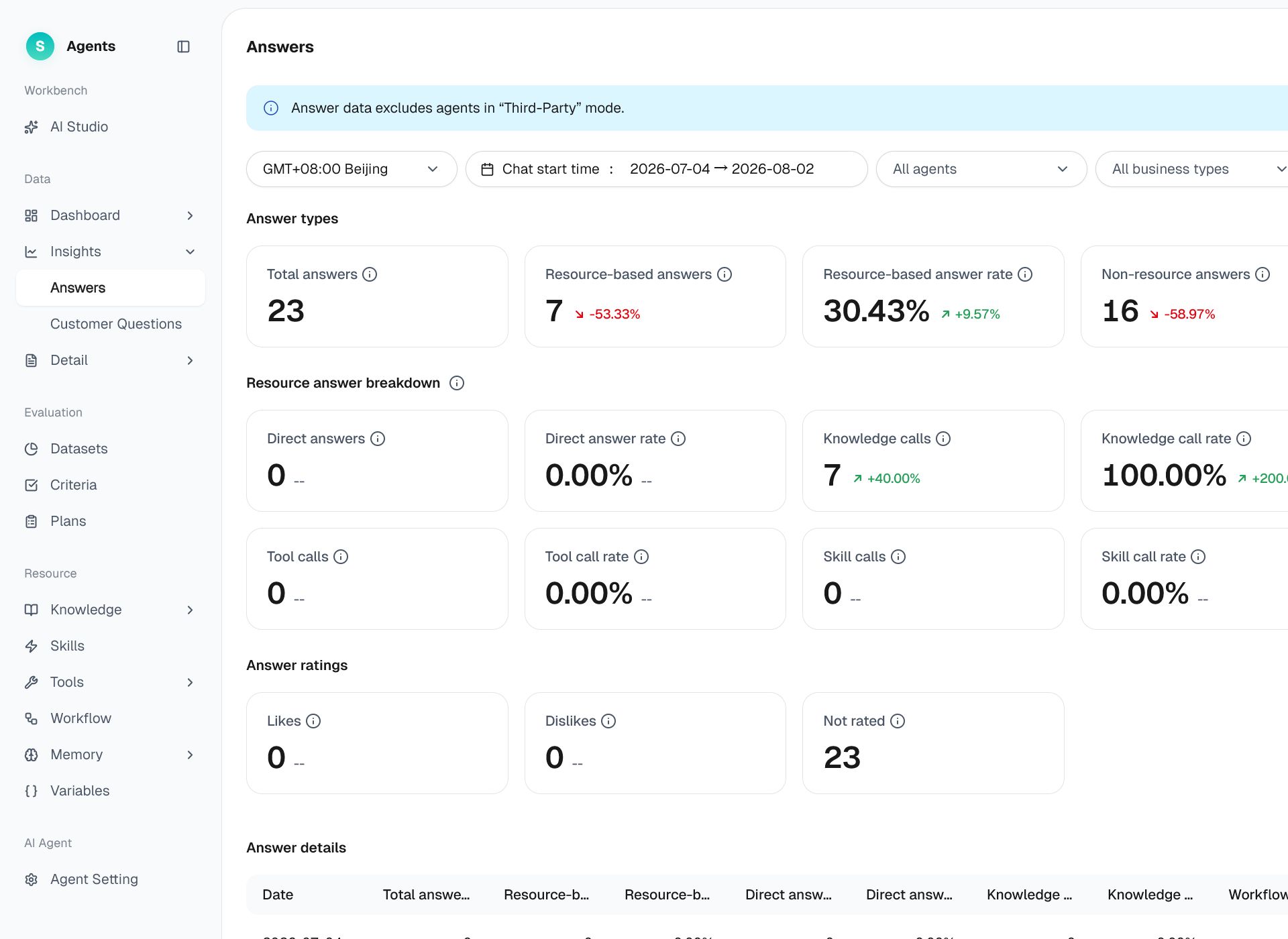
Figure 1: Answers
# Answers Overview
Before using Answers, familiarize yourself with its use case and purpose:
- Use case: Review data to determine whether a bot is operating abnormally—for example, whether its resource-based answer rate or flow invocation rate has decreased.
- Purpose: Quickly identify bot anomalies using detailed answer data filtered by time period, bot, business type, and channel.
# How to Use Answers
Go to Data › Analysis › Answers.
# • Global Filter Bar
- Time zone: GMT+8:00 Beijing by default.
- Conversation start time: The last 7 days by default, with a maximum range of 180 days.
- Bot: All bots by default. Multi-select and search are supported.
- Business type / Channel type / Consultation channel: All values by default. Consultation channel options depend on the selected channel type.
# • Review Answer Quality
Answers is aggregated by date and includes answer counts, answer rates, and like/dislike data.
- The statistical dimension identifies the date associated with the data.
| Type | Metric Details |
|---|---|
| Statistical dimension | Date |
- Count metrics show the number of bot answers and invocations of each resource type.
| Type | Metric Details |
|---|---|
| Count metrics | Total answers, answers using resources, answers without resources, direct answers, knowledge invocations, flow invocations, tool invocations, skill invocations |
- Rate metrics show the percentage of each answer type and resource invocation type.
| Type | Metric Details |
|---|---|
| Rate metrics | Resource-based answer rate, non-resource answer rate, direct answer rate, knowledge invocation rate, flow invocation rate, tool invocation rate, skill invocation rate |
- Like/dislike metrics show how customers rated bot answers.
| Type | Metric Details |
|---|---|
| Like/dislike metrics | Likes, dislikes |
# • Locate Problems Alongside Other Pages
- Set the filter conditions and query the answer data for the selected period.
- Focus on disliked or unresolved answers to identify quality issues.
- Use Customer Questions to review high-frequency questions, then send the issue to AI Studio for optimization.
Note: The fields and metrics displayed on the page are subject to the actual product.
Last Updated: 8/6/2026, 4:27:14 PM