
Agent Statistics Guide
# Agent Statistics Guide
——Learn about the usage methods and indicators of Agent Statistics through this article
# Role of Agent Statistics
We would like you to know about the usage scenarios and roles of the Agent Statistics first:
● Help management assess the workload, work quality and reception of agents
● Support performing data permission isolation by skill group or department and viewing agent reception data and work status data
● Conduct Timeshare Reception Statistics based on different time periods
# How to use Agent Statistics
You can find Agent Statistics from the livechat console menu:
# ● Data Filter Rules and Conditions
Support data permission isolation by department or skill group.
When querying by department, support filtering by time and agent.
When querying by skill group, support filtering by time, department and agent.
When filtering by time, support filtering by Total, Daily Report, Weekly Report and Monthly Report. The minimum time unit is day.
# ● Metrics Overview
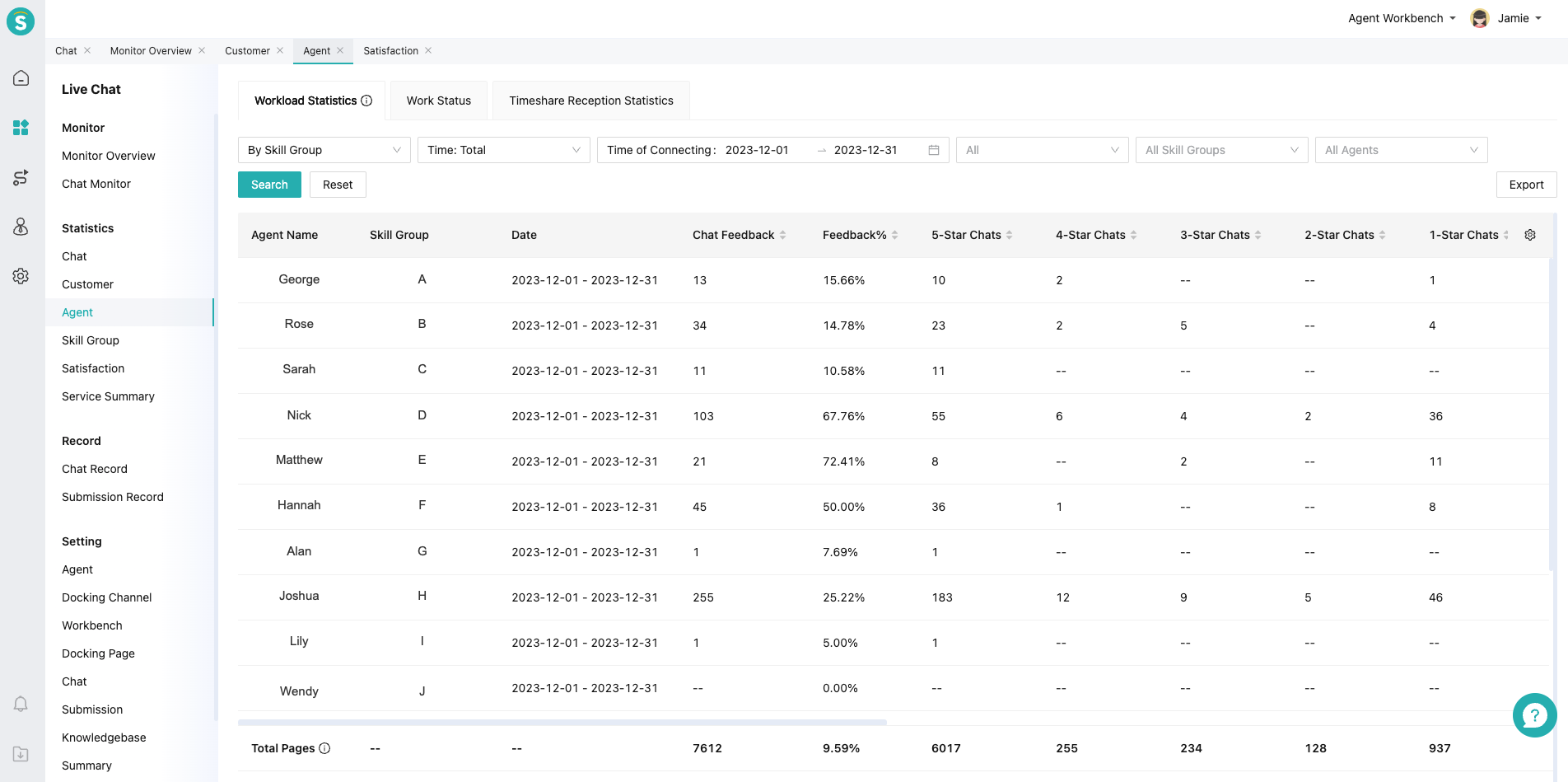
Agent Statistics includes three reports: Workload Statistics, Work Status and Timeshare Reception Statistics.
Workload statistics data includes such indicator types as Agent Work Data, Chat Data, Message Data, Response Data, Satisfaction Data and Lead Data.
| Type | Indicator Details |
|---|---|
| Agent Work Data | Agent Nickname, Agent Email, Agent Skill Group. |
| Chat Data | Total Chats, Independent Reception Chats, Valid Chats, Valid Information Collection Chats, Invalid Chats, Valid Reception Chats, Invalid Reception Chats, Valid Interactive Chats, First Response Chats (Initial Reception), Avg. Transfer Acceptance Time, First Response Chats (Post-Transfer), Valid Inquiry Chats, Valid Reception Chat Rate, Transfer-In Chats, Transfer-Out Chats, Unattended Chats, Unattended Chat Rate, Final Reception Chats, First Contact Resolution (24h), FCR Rate (24h), Max Concurrent Chats, Proactive Chats, Agent Inquiry Duration, Avg. Agent Reception Time, Avg. Total Chat Duration, Resolved Chats, Unresolved Chats, Chats Taken Over, Unlabeled Resolution Chats, Agent Final Response Rate, Chats Taken Away, Agent Connection Rate, Human Chat Turns, Human Chat Response Alert, Human Chat Response Alert Rate, Assisted Chats, SLA Breached Chats, SLA Breach Rate (Chats). |
| Message Data | Total Chat Messages, Agent Messages, Customer Messages, Q&A Ratio, Agent Character Count, SLA Breached Messages, SLA Breach Rate (Messages). |
| Response Data | Average First Response Time, First Response Rate, First Response Rate After Transfer, Avg. Response Time, Max Response Time, Response Within 30s Rate, Response Within 60s Rate. |
| Satisfaction Data | Rated Chats, Rating Participation Rate, Customer-Initiated Survey Participations, Customer-Initiated Participation Rate, Survey Invitation Count, Survey Invitation Rate, Agent-Invited Survey Participations, Agent-Invited Participation Rate, Satisfaction Rate (Level 2 Evaluation), Dissatisfaction Rate (Level 2 Evaluation), Average Rating (5-Star), Positive Rating Rate (5-Star), Neutral Rating Rate (5-Star), Negative Rating Rate (5-Star), 5-Star Ratio, 4-Star Ratio, 3-Star Ratio, 2-Star Ratio, 1-Star Ratio, Average Rating (10-Point), Positive Rating Rate (10-Point), Neutral Rating Rate (10-Point), Negative Rating Rate (10-Point), 10-Point Ratio, 9-Point Ratio, 8-Point Ratio, 7-Point Ratio, 6-Point Ratio, 5-Point Ratio, 4-Point Ratio, 3-Point Ratio, 2-Point Ratio, 1-Point Ratio, Satisfied Chats (Level 2 Evaluation), Dissatisfied Chats (Level 2 Evaluation), Positive Rating Chats (5-Star), Neutral Rating Chats (5-Star), Negative Rating Chats (5-Star), 5-Star Chats, 4-Star Chats, 3-Star Chats, 2-Star Chats, 1-Star Chats, Positive Rating Chats (10-Point), Neutral Rating Chats (10-Point), Negative Rating Chats (10-Point), 10-Point Chats, 9-Point Chats, 8-Point Chats, 7-Point Chats, 6-Point Chats, 5-Point Chats, 4-Point Chats, 3-Point Chats, 2-Point Chats, 1-Point Chats. |
| Lead Data | Remark Count. |
Workload Statistics covers agent status-related data and supports filtering by department, time, and agent.
Timeshare Reception Statistics supports filtering by department or skill group to show the number of customers received by agent in different time periods.
Indicator definitions and formulas are displayed in the report and can be viewed in the following location.
# ● Indicator Count Method
When the chat is transferred or taken away, the following indicators will be counted according to the reception of each customer in the chat.
Indicators involved include: Total Chats, Independent Reception Chats, Valid Chats, Valid Info-Collecting Chats, Invalid Chats, Valid Reception Chats, Invalid Reception Chats, Valid Inquiry Chats, Valid Reception Chat %, Unreceived Chats, Unreceived Chat %, Proactive Chats, Avg. Total Chat Duration, and Agent Connection %.
Transfer scenario cases:
Agent A transfers to agent B: Customer spoke during reception by A, but agent A didn't speak; customer didn't speak during reception by B, but agent B spoke.
Agent A: Total Chats = 1, Valid Inquiry Chats = 1, Valid Reception Chats = 0, Unreceived Chats = 1;
Agent B: Total Chats = 1, Valid Inquiry Chats = 0, Valid Reception Chats = 0, Unreceived Chats = 0, Invalid Reception Chats = 1.
# ● Other Functions
Indicator custom display: Workload Statistics and Work Log Report. You can control which indicators are displayed and the display order by Settings button in the report.
Report export function: Support export by custom display fields.
Open API:
Agent Statistics Data API: support acquiring agent statistics data by calling this API. Agent Statistics (opens new window)
Agent Login Duration Statistics Data API: support acquiring agent login duration data by calling this API. Agent Login Duration Statistics (opens new window)
# FAQ
● Q: What is the difference between the indicator calculation method of Agent Statistics and the old version of Agent Statistics?
A: The concept of sub-chat is introduced into the Agent Statistics. The counting method is sub-chat counting, and the influencing scenarios are the transfer and takeaway scenarios. The counting method of the old version of Agent Statistics is the whole chat counting, and each agent indicator in the transfer or takeaway scenario is the same. Compared with the old version of Agent Statistics, the counting method can better reflect the actual workload of each agent.