
Satisfaction Statistics Guide
# Satisfaction Statistics Guide
——Learn about the usage methods and indicators of Satisfaction Statistics through this article
# Role of Satisfaction Statistics
We would like you to know about the usage scenarios and roles of Satisfaction Statistics first:
● Satisfaction Statistics is used by management and report analysts
● The management uses the report to assess the service of the company, departments and skill groups
● Report analysts focus on the Satisfaction Details, and inspect Neg. Feedback chats to assess the service quality of agents
● You can learn about the Satisfaction Details based on different channel types and inquiry channels
# How to Use Satisfaction Statistics
You can find Satisfaction Statistics from the livechat admin console menu:
# ● Data Filter Rules and Conditions
Support data permission isolation by departments, skill groups or inquiry channels.
When querying by department, support filtering by agents and inquiry channels at department level and below.
When querying by skill group, support filtering by skill groups, agents and inquiry channels at department level and below.
When querying by inquiry channel, support filtering by inquiry channels at department level and below.
Support filtering by time, with the minimum unit of seconds.
Support filtering by channel type.
# ● Metrics Overview
The indicator range only includes agent satisfaction evaluation, excluding bot satisfaction evaluation.
Satisfaction Statistics includes three modules: Indicator Overview Module, Chart Display Module, and Satisfaction Evaluation Details.
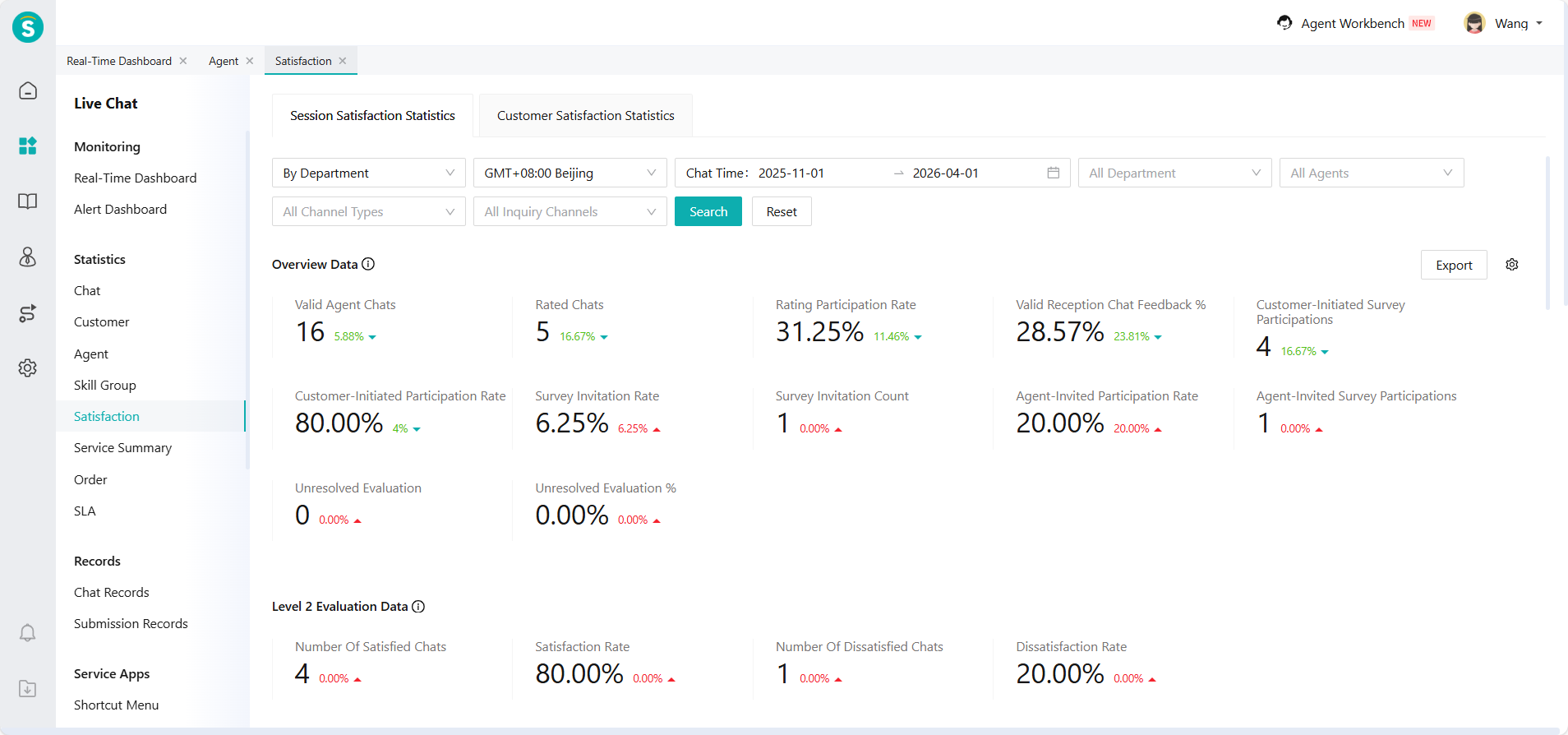
Indicator Overview Module includes the following indicator types: Overview Data, Level 2 Evaluation Data, Rating Data and Scoring Data.
| Type | Indicator Details |
|---|---|
| Overview Data | Valid Agent Chats, Rated Chats, Rating Participation Rate, Valid Reception Chat Feedback %, Customer-Initiated Survey Participations, Customer-Initiated Participation Rate, Survey Invitation Rate, Survey Invitation Count, Agent-Invited Participation Rate, Agent-Invited Survey Participations, Unresolved Evaluation, Unresolved Evaluation %, Resolved Evaluation, Resolved Evaluation %, Total Resolved Evaluation. |
| Level 2 Evaluation Data | Number Of Satisfied Chats, Satisfaction Rate, Number Of Dissatisfied Chats, Dissatisfaction Rate. |
| Rating Data | Average Rating (5-Star), Positive Rating Chats (5-Star), Positive Rating Rate (5-Star), Neutral Rating Chats (5-Star), Neutral Rating Rate (5-Star), Negative Rating Chats (5-Star), Negative Rating Rate (5-Star), 5-Star Chats, 4-Star Chats, 3-Star Chats, 2-Star Chats, 1-Star Chats, 5-Star Ratio, 4-Star Ratio, 3-Star Ratio, 2-Star Ratio, 1-Star Ratio. |
| Scoring Data | Average Rating (10-Point), Positive Rating Chats (10-Point), Positive Rating Rate (10-Point), Neutral Rating Chats (10-Point), Neutral Rating Rate (10-Point), Negative Rating Chats (10-Point), Negative Rating Rate (10-Point), 10-Point Chats, 9-Point Chats, 8-Point Chats, 7-Point Chats, 6-Point Chats, 5-Point Chats, 4-Point Chats, 3-Point Chats, 2-Point Chats, 1-Point Chats, 0 Score Chats, 10-Point Ratio, 9-Point Ratio, 8-Point Ratio, 7-Point Ratio, 6-Point Ratio, 5-Point Ratio, 4-Point Ratio, 3-Point Ratio, 2-Point Ratio, 1-Point Ratio, 0 Score Chat %. |
- Chart Display Module includes the following chart types: Trend Chart and Comparison Chart; comparison cycles are: yesterday, WoW, and MoM.
Indicators include: Valid Agent Chats, Total Feedbacks, Satisfied No. (Level 2 Evaluation), Dissatisfied No. (Level 2 Evaluation), Avg. Star (Star), Pos. Feedbacks (Star), Moderate Feedbacks (Star), Neg. Feedbacks (Star), Avg. Score (Score), Pos. Feedbacks (Score), Moderate Feedbacks (Score), Neg. Feedbacks (Score).
- Satisfaction Evaluation Details is display in chat dimension and supports viewing chat details.
Indicators include: Evaluation Time, Evaluation Type, Evaluation Mode, Resolved or Not, Level 2 Evaluation, 5 Stars Rating, 10 Scoring, Evaluation Label and Evaluation Content.
- Indicator definitions and formulas are displayed in the report and can be viewed in the following location.
# ● Other Functions
Indicator custom display: You can control which indicators are displayed and the display order by Settings button in the report through Indicator Overview.
Report export function: Indicator Overview and Satisfaction Evaluation Details support export.
Open API:
Agent Satisfaction Statistics API: support acquiring agent satisfaction evaluation statistical results by calling this API. Agent Satisfaction Statistics (opens new window)