
Description of Customer Assignment Rules
# Description of Customer Assignment Rules
——Make full use of system rules to assign appropriate agent for your customers and improve service quality and marketing conversion
# Role of Customer Assignment Rules
The applicable scenarios of Customer Assignment Rules are as follows:
● Assign agent efficiently for your customers when receiving inbound calls through the configuration of agent assignment setting.
● When agent response times out, it will automatically transfer through system rules to improve customer service quality and ensure customer satisfaction.
# How to Use Customer Assignment Rules
Agent Assignment Rules can be set through system functions in: Live Chat > Setting > Chat > Customer Assignment Strategy
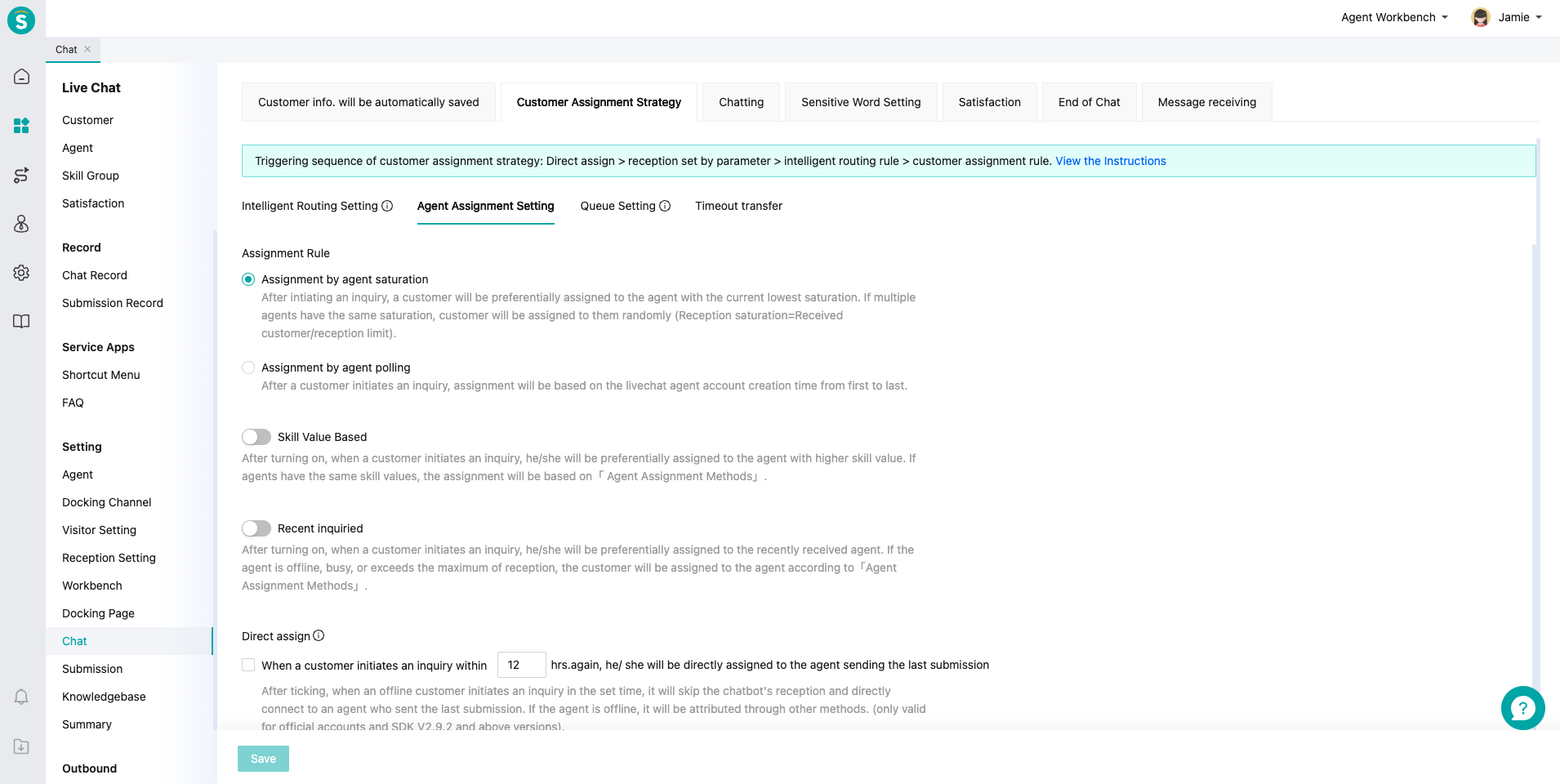
# Rule Description
# ● Description of rules supported by admin console:
| Serial No. | Rule | Description | Configuration Path |
|---|---|---|---|
| 1 | Assignment by Code Designated Agent/Skill Group | Sobot channel supports enterprises to designate reception skill groups or agents through parameter passing, and supports overflow rules. | Refer to: Development Document |
| 2 | Direct Customer Assignment: Direct Assignment by Agent Sending Offline Messages | Official account and SDK channels support directly assigning customer to agent when the customer inquires again within the set time after the agent has sent offline messages. | Chat > Customer Assignment Strategy > Agent Assignment Setting > Direct Assign |
| 3 | Direct Customer Assignment: Direct Assignment by Agent Closing Chat | H5 channel supports directly assigning customer to agent when the customer inquires again within the set time after the agent has closed the chat. | Chat > Customer Assignment Strategy > Agent Assignment Setting > Direct Assign |
| 4 | Intelligent Routing Assignment | Support assigning inquiry chats that meet the set conditions like customer channel, identity and IP to the designated agent or skill group. | Chat > Customer Assignment Strategy > Intelligent Routing Setting |
| 5 | Assignment by Agent Occupancy | After initiating an inquiry, a customer will be first assigned to the agent with the lowest occupancy. If multiple agents have the same occupancy, customer will be assigned to them randomly (Reception occupancy = Received customers / Reception limit). | Chat > Customer Assignment Strategy > Agent Assignment Setting > Allocation Strategy |
| 6 | Assignment by Agent Polling | Assign the inquiry customer to agent in order of creation time of livechat agent account after the customer initiates an inquiry. | Chat > Customer Assignment Strategy > Agent Assignment Setting > Allocation Strategy |
| 7 | Assignment by Skill Value | When a customer initiates an inquiry, he/she will be first assigned to the agent with the highest skill value, followed by agents with lower skill value. When the skill value is same, they will be assigned according to the occupancy or polling rule in「Agent Assignment Methods」. | Chat > Customer Assignment Strategy > Agent Assignment Setting > Skill Value Based |
| 8 | Designated Assignment of Frequent Customer | When a customer initiates an inquiry, he/she will be first assigned to the recent reception agent. If the agent is offline, occupied, or exceeds the maximum of reception, the customer will be assigned according to the occupancy or polling rule in「Agent Assignment Methods」. Note: After enabling「Designated Assignment of Frequent Customer」rule, this rule is still valid when「Skill Value Assignment」and「Intelligent Routing Assignment」 rules are enabled, and its priority is higher than the above two assignment rules. | Chat > Customer Assignment Strategy > Agent Assignment Setting > Last Agent Mode |
| 9 | VIP Customer Queue Priority | When a customer initiates an inquiry, the system will manage customer queue priority based on customer's VIP tag. | Chat > Customer Assignment Strategy > Queue Setting > Queue Priority Rules > VIP Priority in Queuing |
| 10 | Designated Customer Queue Priority | When a customer initiates an inquiry, enterprise developers can pass the priority field. The system will decide the customer as the designated customer, and the customer will be first received by agent. | Chat > Customer Assignment Strategy > Queue Setting > Queue Priority Rules > Priority for Appointed |
| 11 | Timeout Transfer | If the response time of the selected skill group exceeds the set time, the chat will be automatically transferred to the set agent or skill group. | Chat > Customer Assignment Strategy > Timeout Transfer |
| 12 | Queue Auto Interruption | After enabling, when customer queue time exceeds the set time, the system will automatically interrupt the queue (after disabling, queue in desktop site and mobile site channels will be automatically interrupted after customer has queued for 5 mins; SDK below v3.1.3 does not support senidng prompt and reply of queue auto interruption.) | Chat > Customer Assignment Strategy > Queue Setting > Queue Auto-Disconnect Rule |
Note: No queue in always on mode.
# ● Main Assignment Rule Relation and Priority Description:
Assignment by Code Designated Agent/Skill Group > Direct Customer Assignment > Intelligent Routing Assignment > Priority Assignment of Frequent Customer > Assignment by Agent Skill Value > Assignment by Agent Occupancy/Polling